Why saved credentials do not mean your energy device is connected
Why saved credentials do not prove an energy device is connected, and how verified telemetry protects solar, battery, EV, tariff apps and control states.
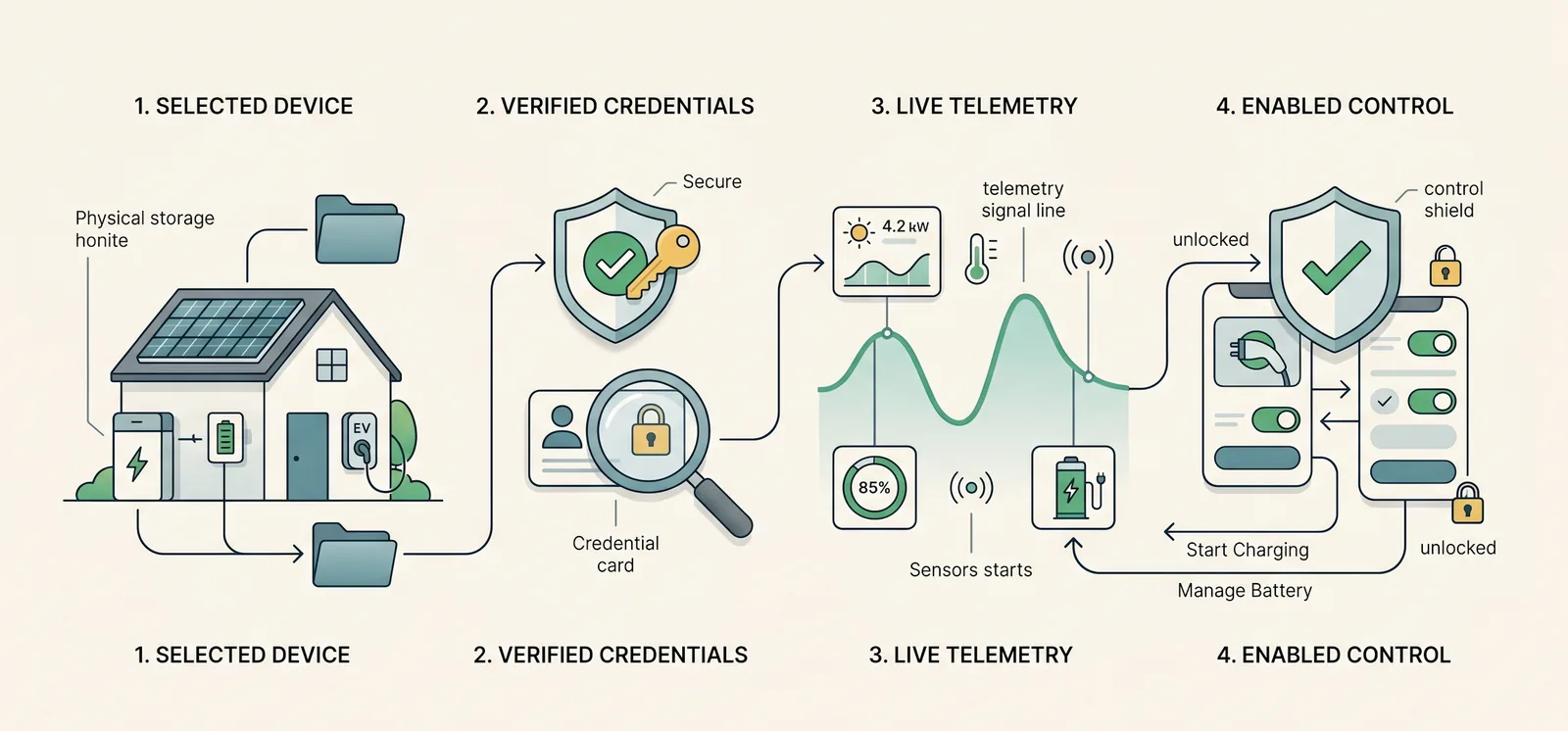
A renewable-home app can look connected before the home is actually ready to trust it.
That is not always a bug. It is often a language problem.
A customer may have selected Solis, entered a zappi API key, connected an Octopus account and chosen a tariff. Those steps matter, but they do not all prove the same thing. One step says the device belongs in the setup. Another says the credentials were accepted. Another says fresh telemetry is arriving. Another says control is available and safe to enable.
If those states are flattened into one word, customers and installers are left guessing why a dashboard is still pending, why a device shows stale data, or why a control button is unavailable.
This guide is for UK renewable-home customers, installers and partner brands. It explains the practical difference between saved credentials, verified devices, live telemetry and enabled control, with examples from Solis, zappi and Octopus-style home energy setups.
The quick version
For a solar, battery, EV and tariff home, "connected" should not mean everything at once.
A careful app should separate four states:
| State | What it proves | What it does not prove |
|---|---|---|
| Selected device | The customer or installer expects this source to be part of the home | The credentials work |
| Verified credentials | The provider accepted the sign-in, API key or account details | Fresh live data is flowing |
| Live telemetry | The provider is returning usable, recent data for this installation | Control writes are enabled |
| Enabled control | The device and setup support the requested action, and the customer has enabled it | Every future action will be appropriate |
The practical rule is:
Treat each setup stage as evidence for one thing, not permission to assume the whole home is ready.
That keeps the customer experience calmer and more honest.
Why this distinction matters in real homes
Most renewable-home customers do not think in terms of provider health, telemetry freshness or control capability. They think in terms of ordinary questions:
- "Is my inverter connected?"
- "Why has the dashboard stopped updating?"
- "Why can I see my battery but not control it?"
- "Why is my tariff visible, but my smart EV slot is missing?"
- "Why did setup ask me to choose an inverter after SolisCloud sign-in?"
Those questions are normal. The answer is usually not "the whole setup failed".
It may be that the account was accepted, but the provider has not sent a first update yet. It may be that the customer has selected the right device type, but has not entered the details. It may be that visibility is working, but control writes are not available for that installation. It may be that Octopus tariff data is connected, while Intelligent Octopus Go smart-charge slots need a separate sign-in where supported.
If the app only has two states, connected or disconnected, those situations are hard to explain. A better customer app gives each stage its own language.
Selected is not connected
The first stage is selection.
During onboarding, a customer may say the home has a Solis hybrid inverter, a zappi charger and an Octopus tariff. That is useful topology information. It tells the app what the customer expects to connect.
But it is not the same as a live integration.
A selected device can be pending. It can appear in a setup list so the customer knows what to do next. It should not be treated as a verified data source. It should not turn on a dashboard card, show live provider data, or enable controls by itself.
This distinction protects no-data states. A home with selected-but-unconnected solar should not be shown as a verified solar home. A selected EV charger should not become an active EV control source until the connection and live state support it. A selected tariff provider should not make the dashboard invent rates.
The Solis, zappi and Octopus setup checklist covers the broader setup sequence. The key point here is narrower: a setup intention is useful, but it is not proof.
Verified credentials are only one step
The next stage is credential verification.
This is where the provider accepts the details. For example:
- SolisCloud sign-in returns successfully, or an API-key fallback verifies where used.
- zappi or myenergi details pass provider checks.
- Octopus accepts the API key and account number.
- LuxpowerTek (beta), Sunsynk (beta) or SigEnergy (monitoring) account details are accepted.
That is important evidence. It means the app can proceed.
But credentials still do not prove the whole data contract is ready.
A provider may accept an account that contains more than one plant or inverter. The customer may still need to choose the exact inverter for the home. A provider may accept an API key, then take time to return the first useful telemetry update. A tariff connection may provide rates, while a smart charging feature needs another supported connection step.
This is why a setup screen should be comfortable saying "checking", "telemetry pending" or "choose the inverter for this home" instead of jumping straight to a confident live state.
That language is not friction for its own sake. It stops the app from over-trusting partial evidence.
Live telemetry is different from account access
Live telemetry means the app has recent provider data that can be used for the customer view.
For a Solis home, that may include inverter, solar, battery and grid information where the source exposes it. For a zappi home, it may include charger state and EV charging context where supported and configured. For Octopus, it may include tariff and meter context where available. Manual tariffs can still provide customer-entered rate periods, but they are not the same as a live supplier connection.
Telemetry has quality states too.
It can be fresh. It can be delayed. It can be stale. It can be pending the first update. It can be unavailable because provider updates have stopped. Those are different customer experiences.
For example, a connected inverter with stale telemetry should not be treated like an unselected device. The customer has done the setup, but the provider data may be delayed. Likewise, a newly connected device may be "status pending" while the app waits for the first provider update.
The practical customer message is:
We know this integration belongs to the home, but we are still checking whether fresh data is available.
That is better than showing fake zeroes or hiding the reason controls are unavailable.
For a wider view of source quality, see home energy dashboard source of truth: what to check.
Visibility is not control
Control is the most sensitive stage.
An app may be able to see a device without being allowed to control it. That is especially important for home batteries and EV chargers, because a command can change real household behaviour.
A supported Solis setup may be visible before control writes are enabled. Solis is our main focus; LuxpowerTek (beta), Sunsynk (beta) and SigEnergy (monitoring) homes can also sign up, so visibility and control should be treated separately. A zappi may be linked for charger context, while remote charging still depends on device state, lock settings and supported control paths. An Octopus tariff may be connected for rates, while smart-charge slots sync from the same API key once Intelligent Octopus Go is detected.
The safe stance is simple:
- show visibility when the data source is verified and useful;
- label delayed or pending telemetry honestly;
- enable control only where the device, permissions, live state, customer settings and backend checks support it.
That is why "I can see the battery" does not always mean "the app should control the battery". It also explains why a product may show an inverter as connected for telemetry while saying battery charge or export control is unavailable.
For customers, this can feel cautious. For a renewable-home app, it is the right kind of caution.
A practical example: SolisCloud sign-in
SolisCloud sign-in is a good example because it can include more than one setup stage.
The customer starts by signing in with SolisCloud. If the account has a clear supported inverter for the installation, the app can continue. If the account contains multiple possible inverters, the customer may need to choose the one for this home before the setup is complete.
After that, the app still needs to wait for useful device state.
The first checks should be ordinary physical checks:
- Does the inverter belong to the right property?
- Does the battery state of charge look believable?
- Does grid import and export direction make sense?
- Does solar only appear where the home has verified solar?
- Is telemetry fresh enough for live dashboard use?
- Are controls enabled for this installation, or is visibility the current supported state?
The SolisCloud API key guide explains the manual key setup path. The important product language is that SolisCloud access helps verify data access. It should not be stretched into a promise that every control feature is available immediately.
A practical example: zappi and EV context
zappi setup has its own split between access, measurement and control.
An API key or account connection can prove the app has access to the myenergi data source. That does not automatically prove the CT roles are correct, the charger belongs to the expected property, the vehicle is connected, or remote actions are appropriate at that moment.
For zappi homes, the follow-up checks matter:
- Does the charger in the app match the physical charger at the home?
- Does live charger state broadly match the myenergi app?
- Are CT roles and directions understood where CT data is used?
- Does EV charging appear as EV context, not just a mysterious home load?
- Are remote actions blocked when the charger, lock state or provider response says they should be?
This is why the zappi CT mapping guide sits after the API-key guide. The credential step opens the door. CT mapping and live charger state decide whether the EV story is trustworthy.
For battery homes, that matters because EV charging can be one of the largest loads in the property. If the EV source is unclear, the battery may appear to behave strangely even when the hardware is doing what it was told.
A practical example: Octopus tariff and smart slots
Octopus is another place where one "connected" label can hide several different things.
An Octopus API key and account number can give tariff and meter context where available. That is enough for many tariff-aware views. It can help the app understand rates, account context and day-ahead price information where the tariff exposes it.
But not every Octopus-related behaviour comes from the same evidence.
For Intelligent Octopus Go homes, smart-charge slots are not the same as a basic tariff connection. On Intelligent Octopus Go, slots sync from the same Octopus API key and account number. If they are missing, open Devices and choose Sync slots.
That difference matters because the customer may ask:
"Why can I see my tariff, but not my next smart charging slot?"
The answer may be that tariff evidence is present, while smart-slot evidence is not yet connected or needs reauthorisation.
The safer product language is not "Octopus is broken". It is "tariff rates are connected, but smart charging context still needs attention."
For the first setup step, see how to get your Octopus Energy API key and account number. For non-Octopus or unsupported tariff cases, manual tariff setup explains how customer-entered rate periods can provide useful context without pretending to be a live supplier sync.
Red flags in device setup language
When a customer app treats all setup stages as one state, the symptoms are easy to spot.
| Red flag | Why it is risky |
|---|---|
| A selected provider is shown as live before credentials are entered | The app may be treating intent as evidence |
| A saved API key instantly turns on controls | Credential verification and control capability are being mixed |
| Stale telemetry looks the same as fresh telemetry | Customers may trust old data without knowing it |
| A tariff settings form appears as a connected supplier | Manual rates and supplier sync are different sources |
| The app says all devices are verified when only one is connected | Partial setup is being overstated |
| A no-solar home shows solar cards or "Solar 0%" | The app may be using a template instead of verified topology |
| Control is unavailable with no reason | Customers cannot tell whether setup, permissions or provider state is blocking it |
| A reconnect prompt does not explain which provider needs attention | The customer cannot fix the right part of the chain |
These are not only UI issues. They change whether a customer can trust the app.
What installers should explain at handover
Installers do not need to teach every data state in detail. They do need to set expectations.
A useful handover for a connected home should explain:
- which device sources have been selected for the home;
- which accounts or credentials have been connected;
- which provider is expected to own solar, battery, grid, EV and tariff data;
- whether telemetry has been checked on one normal day;
- which features are visibility-only for now;
- which controls are supported, where verified and customer-enabled;
- what a pending, stale or reconnect-required state means.
That reduces support confusion later.
For example, if a Solis inverter is connected for telemetry but control writes are not enabled for the installation, the customer should know that visibility is still useful. If a zappi is connected but CT mapping needs review, the customer should know why the EV view may be limited. If Octopus tariff rates are connected but smart slots need a separate supported sign-in, the customer should know why the tariff card and EV schedule may not update together.
The handover message does not have to be technical. It can be as simple as:
"The app first proves access, then waits for fresh data, then enables controls only where the setup supports them."
That sentence prevents a lot of over-expectation.
How 1app.energy approaches connected devices
1app.energy is a customer-facing SaaS layer for renewable homes. The strongest current fit is supported Solis hybrid inverter and Solis inverter homes where customers want one app for solar, battery, EV and tariff context.
The product principle is:
Connect supported sources, verify what they can prove, then show and control only what the home supports.
In practice, that means 1app.energy can use selected devices to guide setup, verified credentials to establish provider access, telemetry health to explain whether live data is fresh, and control checks to decide which actions should be available.
That separation is deliberately cautious.
It helps avoid treating a saved credential as a live connected device. It helps avoid treating delayed telemetry as a fresh dashboard. It helps avoid treating visibility as permission to control. It also helps installers and partner brands give customers a clearer handover after installation.
Where supported and customer-enabled, 1app.energy can help coordinate battery behaviour, EV charging context and tariff-aware operation. But the app should earn that confidence from the installation state, not assume it from a form field.
Common questions
Why does my device show pending after I connected it?
The provider may have accepted the connection, but the app may still be waiting for the first useful telemetry update. Pending can be a normal short-term state after setup. If it persists, the provider account, selected plant, API permissions or installation match may need review.
Is an API key enough to prove a device is live?
No. An API key can prove access to a provider account. The app still needs to confirm the data belongs to the correct home, that provider updates are arriving, and that the source is allowed to own the values shown on the dashboard.
Why can I see my battery but not control it?
Visibility and control are separate capabilities. The app may be able to read battery or inverter data while control writes are unavailable, not verified, disabled for the installation, or not appropriate for the current device state. Control should only be offered where supported, verified and customer-enabled.
Why can my tariff be connected while smart EV slots are missing?
Basic tariff data and smart-charge slot data can come from different evidence. For Octopus homes, the API key can provide tariff context where available. On Intelligent Octopus Go, slots sync from the same Octopus API key. If they are missing, open Devices and choose Sync slots.
Should a dashboard show zeroes while setup is incomplete?
Not for values that are unknown or not applicable. A real zero means the equipment exists and is currently reporting zero. Missing setup, absent equipment and delayed telemetry should be shown as pending, unavailable or hidden, depending on the case.
Does connected status mean automation is enabled?
No. Connected status should not be treated as automation permission. Automation depends on supported devices, verified setup, fresh enough telemetry, customer settings, control capability and the specific behaviour being requested.
Final thought
In a simple app, "connected" sounds helpful. In a renewable home, it can be too vague.
A customer does not just need to know whether an API key was saved. They need to know whether the app understands the right home, has fresh data, and can safely act where the setup supports it.
That is the difference between a dashboard that looks connected and a home energy app that is genuinely useful.
Visit 1app.energy/signup to check your inverter and start signup.
Does this sound like your home?
Your setup might already qualify.
Choose your inverter to start. Supported homes create an account straight away; other setups join the compatibility list.