Battery reserve floor: what UK solar homes should check
A practical guide to battery reserve floor settings for UK solar battery homes with EV charging, smart tariffs and 1app.energy Smart Control.
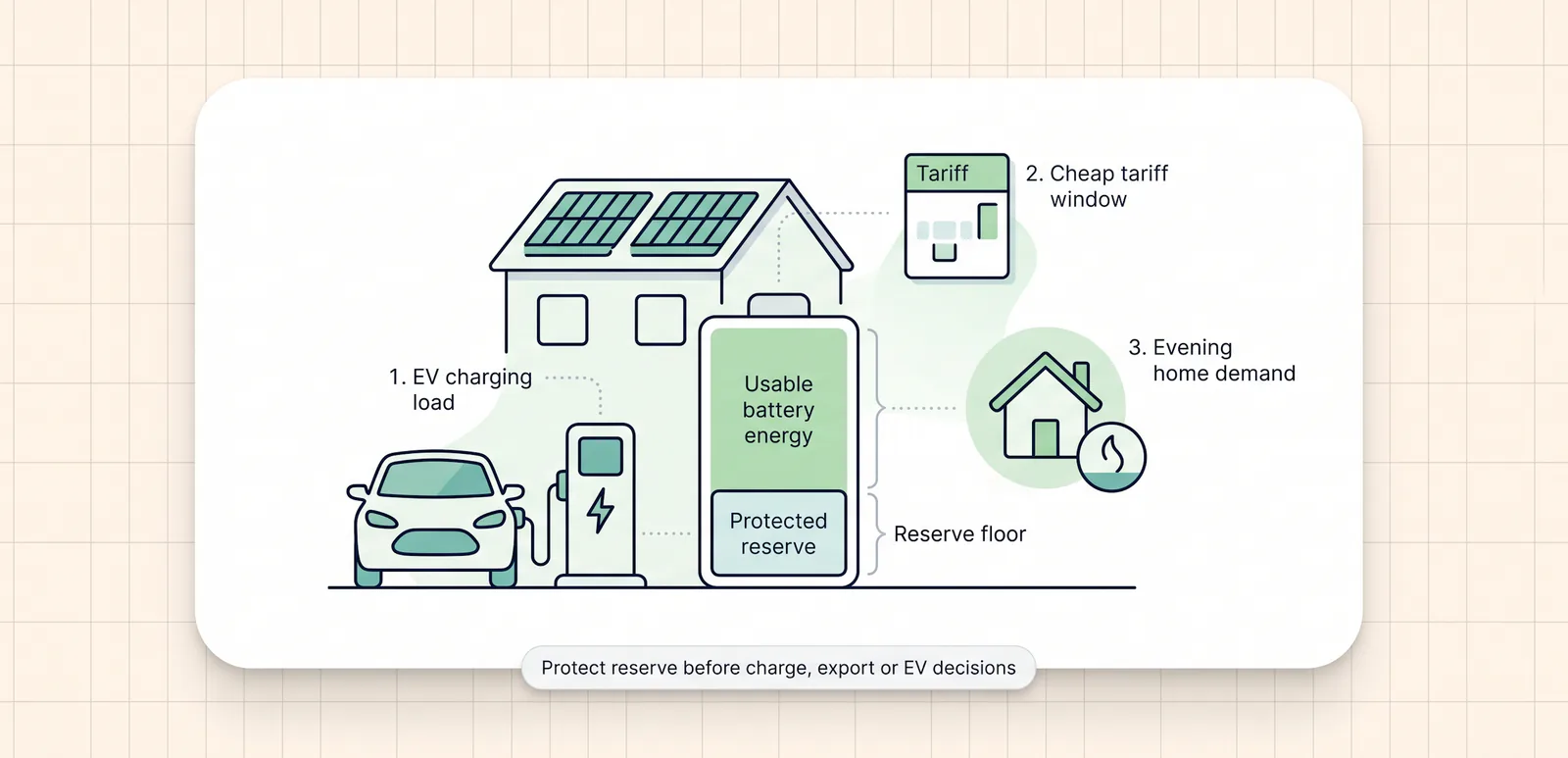
A battery reserve floor sounds like a small setting. In a solar, battery and EV home, it can shape the whole day.
Set it too low and the battery may look efficient while leaving the home exposed before an expensive period, a cooking peak or an EV session. Set it too high and the battery may never have enough usable room to soak up solar, charge cheaply or respond to tariff opportunities.
This guide is for UK renewable-home customers and installers who want to understand what the reserve floor does before trusting smart battery behaviour. It explains the practical checks, the common failure modes and how 1app.energy treats reserve as a control guardrail where supported and verified.
The quick version: battery reserve floor checks
The battery reserve floor is the minimum state of charge the system should protect for the home.
Before relying on it, check:
- the reserve floor is intentional, not copied from an example setup;
- the battery capacity and state of charge look believable;
- the EV charger context is clear where EV sessions can drain the battery;
- the tariff setup gives the app enough price context to plan refill windows;
- any Time-based Control battery target is above the reserve floor;
- export behaviour is only considered where the tariff, inverter control path and customer settings support it.
The practical rule is:
The reserve floor is not spare battery. It is the line the system should avoid crossing unless the customer and hardware setup make that behaviour safe.
That makes it one of the first settings to check before diagnosing odd battery behaviour.
What battery reserve floor means in practice
Most customers think about battery charge as one number: 80 percent full, 40 percent full, 15 percent full.
Smart control needs a second number: how much of that charge should be protected.
If a home has a 10 kWh battery and a 20 percent reserve floor, roughly 2 kWh is being held back as protected battery. The exact usable energy depends on the battery, inverter, efficiency losses and manufacturer limits, but the idea is simple: not every stored unit should be treated as available for export, EV charging or tariff trading.
That distinction matters because a battery can be asked to do several jobs:
- cover the house during expensive periods;
- hold solar for the evening;
- avoid discharging into an EV session;
- charge during cheaper tariff windows;
- leave room for tomorrow's solar;
- export stored energy where that is supported and makes sense.
Those jobs can compete with each other. The reserve floor is one of the guardrails that stops one job from quietly breaking another.
For a wider view of the related checks, see home battery export checks before selling stored energy.
Why there is no universal reserve percentage
There is no single reserve floor that is right for every UK solar battery home.
A small battery in a high-use home may need a different floor from a larger battery in a low-use home. A home with a heat pump, evening cooking load or regular EV charging may need more protected energy than a home with lighter demand. A customer who mostly wants home coverage may choose a different stance from a customer who is comfortable using more battery for tariff value.
The right setting depends on:
- battery size and usable capacity;
- typical evening and morning load;
- whether the home has an EV charger;
- whether the tariff has reliable cheap refill periods;
- whether solar forecast and season make refill likely;
- whether the customer wants home-first behaviour, simple cheap-window charging or adaptive value behaviour.
It also depends on whether the reserve floor is actually synced to the device that enforces it.
In current 1app.energy settings, the hardware view includes an inverter reserve floor for supported setups. The helper text describes it as the lowest battery level to keep back, and Smart Control uses the same floor. For supported Solis homes where the relevant control path is available, saving the setting can sync the inverter reserve to match.
That is a product behaviour claim, not a promise for every battery. It depends on the installation, provider, permissions and verified control capability.
How reserve floor affects EV charging conflicts
EV charging is one of the easiest ways to expose a weak reserve setup.
An EV can draw more power than the rest of the home. If the battery treats that EV session like ordinary household demand, stored solar can drain into the car when the customer expected the grid, cheap tariff period or solar surplus to handle the session.
This is the problem behind why Octopus smart charging can drain a home battery. The issue is not that EV charging is bad. The issue is that the battery, charger and tariff may not be coordinating around the same event.
Reserve helps, but it is not a complete fix on its own.
A higher reserve floor can reduce how far the battery drains, but the home still needs clean EV context. The app needs to know whether the EV session is happening, whether the charger is connected where supported, and whether the battery should hold back instead of feeding the car.
For zappi homes, CT roles and charger configuration can also affect the story the dashboard tells. The zappi CT mapping guide for solar battery homes explains that measurement side in more detail.
The key point: reserve is a guardrail, while EV context explains why the load is happening.
How reserve floor affects cheap-window battery charging
Cheap-window charging is not just "fill the battery overnight".
A good target depends on what the home needs next, how much battery is already protected, how long the cheap window lasts and whether tomorrow's solar may refill the battery anyway.
This is where the difference between reserve floor and battery target matters.
The reserve floor is the minimum protected level. A battery target is the level a mode may try to reach during a cheaper tariff period. In 1app.energy Time-based Control, the target is kept above the reserve floor. That prevents a confusing setup where the customer asks the battery to charge to a level that is not actually above the minimum they want protected.
Manual tariff setup matters here too. If the cheap periods are missing or wrong, the app cannot sensibly plan a refill. We cover that tariff foundation in manual tariff setup for solar battery and EV homes.
For customers, the practical check is:
- reserve floor: "What battery level do I want to protect?"
- battery target: "How full should the battery be after the cheap window?"
- tariff source: "Does the app know when that cheap window exists?"
If those three answers do not line up, the battery behaviour may look strange even when the inverter is working.
How reserve floor changes export decisions
Battery export is where reserve discipline becomes especially important.
An export rate can look attractive, but the battery may still be needed later. If the app exports too much stored energy, the home may import later at a worse time. That is why export should not be based on price alone.
In 1app.energy, export to grid is treated as conditional behaviour. It belongs in Autopilot rather than Home First or Time-based Control. It also depends on positive export context, supported inverter control, customer-enabled settings and the wider whole-home picture.
Reserve is part of that picture.
Before a supported home exports stored battery energy, the important question is not "is the battery full?" It is:
How much energy is safely above the reserve floor after the home still has what it needs?
That question is also why EV load can matter in export logic. Exporting stored energy before a car charges, or while the app cannot understand the EV load, can create a poor result for the household.
The safer product stance is to hold when the source data, control path or refill picture is weak.
What 1app.energy treats as source of truth
1app.energy is a customer-facing SaaS layer for renewable homes. The strongest current fit is supported Solis hybrid inverter and Solis inverter homes where customers want one app for solar, battery, EV and tariff.
For reserve behaviour, the important source-of-truth pattern is:
- the inverter or battery source should own battery state and control capability where available;
- the settings backend should own customer-visible control values such as reserve floor and battery target;
- the tariff source should own price windows, either through a supported supplier connection or manual tariff setup;
- the dashboard should show missing or pending data honestly instead of inventing kWh, cost or control confidence.
This is the same principle covered in home energy dashboard source of truth: what to check. A polished dashboard is not enough if each number does not come from the right place.
For reserve specifically, current 1app.energy settings validate the minimum battery state of charge as a whole-number percentage, and Time-based Control requires the battery target to sit above that floor. Export settings are also gated by mode, export rate and verified control availability.
Those guardrails are there because the reserve floor is a control input, not just a display label.
What installers should explain at handover
Installers do not need to turn customers into battery engineers. They do need to explain what the reserve floor is protecting.
A useful handover should cover:
- what reserve floor has been set and why;
- whether the reserve floor is also enforced by the inverter;
- whether the battery has a separate backup or emergency reserve mode;
- what the customer should expect during EV charging;
- whether the tariff is synced or manually entered;
- which smart-control mode fits the customer's goal;
- whether the inverter is visible only or supported for control.
That last point is important. Seeing battery data is not the same as being able to control the battery. A customer may have useful visibility before the installation is verified for control.
For a broader setup sequence, the Solis, zappi and Octopus setup checklist is a good companion to this reserve-floor guide.
Red flags when the battery reserve floor is wrong
Reserve problems often show up as symptoms somewhere else.
Use this table when reviewing a customer setup:
| What the customer sees | What to check |
|---|---|
| Battery reaches reserve too early every day | Reserve may be too high for battery size, demand or cheap-window target |
| Battery drains into an EV session | EV context, charger setup and reserve behaviour may not be aligned |
| Time-based Control never reaches the desired level | Target may be too high for the cheap window, charge rate or control capability |
| Export looks profitable but creates later import | Reserve, refill opportunity and later home load may not be protected |
| Smart Control says setup is incomplete | Required tariff, reserve, permission or control field may be missing |
| Inverter and app show different reserve values | The hardware reserve may not have synced yet or may need a verified control path |
| The battery never has room for daytime solar | Overnight target or reserve may be too high for seasonal generation |
None of these automatically mean the hardware is faulty. They are reasons to check the data chain before changing random settings.
Common questions about battery reserve floor settings
Is battery reserve the same as backup power?
Not always. A reserve floor tells the battery control layer how much state of charge to protect. Backup power depends on the inverter, battery, wiring, EPS or backup circuits and installer configuration. Do not assume a reserve floor guarantees backup behaviour.
Should I use a high reserve floor in winter?
Some homes may prefer a higher protected level in winter because solar refill is weaker and evening demand can be higher. That does not make a high reserve universally right. It should match the battery size, tariff, home load and customer goal.
Can a low reserve floor improve savings?
It can make more battery available for daily use, but it can also leave less protection for later demand. A lower floor is not automatically better. The useful question is whether it improves the whole-home outcome without creating later high-rate import or EV conflicts.
Why does Time-based Control need the target above reserve?
Because the target is the level the battery is asked to reach during cheaper periods. If that target is at or below the reserve floor, it does not give the system useful space above the protected minimum. 1app.energy keeps the target above reserve for that reason.
Does Autopilot ignore the reserve floor?
No. Autopilot is designed to weigh tariff value against protected reserve planning, later home coverage, forecast solar and control safety limits. Export or charge behaviour still depends on supported hardware, verified data, customer settings and backend guardrails.
Can 1app.energy set the reserve on every inverter?
No. Reserve sync and battery control depend on the supported device, verified control path, permissions and current product status. Supported Solis homes are the main public fit today. Visibility may be available before control for some setups.
Final thought on battery reserve floor settings
The battery reserve floor is one of the quiet settings that decides whether a renewable home feels calm or confusing.
It affects EV charging, cheap-window targets, export decisions, solar storage and customer handover. It should be set deliberately, checked against a normal day and treated as a source-of-truth control value where the installation supports it.
1app.energy can help supported homes bring solar, battery, EV and tariff context into one clearer app, with tariff-aware battery behaviour where the setup is verified and the customer enables it.
Visit 1app.energy/signup to check your inverter and start signup.
Relevant smart controls
These mode pages are the closest product-side follow-on from the issue explained in this article.
Autopilot
The best starting mode for most homes. Autopilot charges when power is cheap, keeps battery back for the home, and can export spare battery power when prices are high.
Home First
A simpler home-first mode. It runs the home from your own solar and battery first and avoids automatic battery export.
Time-based Control
A simple schedule-based mode. Time-based Control charges the battery during your cheaper tariff periods until it reaches the battery target you set.
Does this sound like your home?
Your setup might already qualify.
Tell us which devices and tariff you are on. We review every request and invite in order of fit, not sign-up date.