Home battery export checks before selling stored energy
A practical UK guide to home battery export: tariff source, reserve floor, EV load, export limits and verified inverter control before selling stored energy.
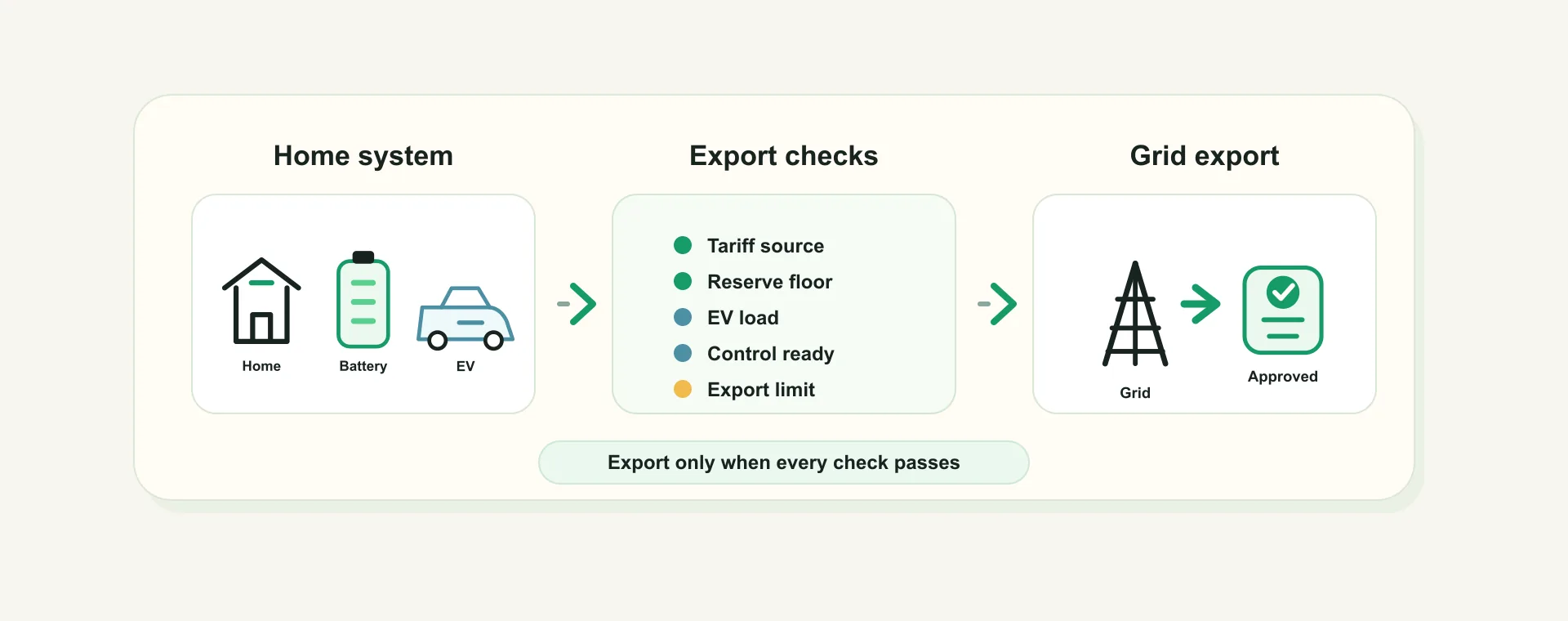
For a UK solar battery home, a high export rate can make battery export look obvious.
If the battery has energy and the grid is paying for export, why not sell it?
For a UK solar battery home, the answer depends on more than the headline rate. Exporting stored energy can be sensible where the tariff, battery reserve, EV demand, inverter control path and export-limit setup all line up. It can also leave the home buying back electricity later at a worse time.
This guide is for homeowners, installers and partner brands who want to understand the checks that should happen before battery export is treated as a smart-control action.
The quick version: home battery export checks
Before enabling home battery export, check five things:
- the export rate is real, positive and belongs to the right tariff or manual tariff setup;
- the battery has usable energy above the protected reserve floor;
- the home has a credible refill plan before the next expensive period;
- the inverter control path is supported, verified and fresh enough to act;
- EV charging, home load and export limits are understood before the battery is sent to the grid.
The practical rule is:
Battery export should be an evidence-based control decision, not a reaction to one attractive price.
That is the difference between a dashboard that shows an opportunity and an app that can help act on it where supported, verified and customer-enabled.
It is also why the safest answer can sometimes be "hold". A good control layer should be willing to ignore an attractive export price when the home still needs reserve, the refill picture is weak, the EV context is unclear, or the inverter control path has not been verified.
Why home battery export is not just a tariff question
Export tariffs are easy to compare as a number. Battery behaviour is harder.
A battery is not spare electricity by default. It may be holding energy for the evening peak, a heat pump run, a cooking period, an EV session, or simply a customer-chosen reserve. If that stored energy is exported too early, the home may import later.
That replacement import can matter more than the export event itself.
This is why a battery export decision should ask:
- What did the battery cost to fill?
- Will the home need that energy later?
- Can the battery refill cheaply before that later demand?
- Is there enough energy above the reserve floor?
- Is the inverter actually controllable, or is the app only receiving telemetry?
If those questions are not answered, "sell when the export rate is high" is too shallow. The export rate is only one input; the whole-home outcome is what matters.
For customers who want to test the economics manually, the battery export profit calculator is a useful screening tool. It is still only one layer. A live home also needs source, reserve and control checks.
Check 1: prove the export rate before enabling export
Battery export should not be enabled against a guessed tariff.
In a supported Octopus setup, tariff and export context may come from the supplier connection where available. For other suppliers, the customer may need to use manual tariff setup for import rates, export rate, standing charge and time-of-use periods where applicable.
The important point is neutrality.
If the export rate is missing, zero, stale or from the wrong property, the app should not pretend there is an export opportunity. The safer state is to leave export disabled or pending until the tariff source is known.
This is reflected in the 1app.energy smart-control settings: export to grid needs positive export context before it can be enabled, and Autopilot can still handle cheap charging and home coverage with export switched off where the rest of the setup supports it.
The same source-of-truth principle appears in home energy dashboard source of truth: what to check. Costs and control decisions should come from the right backend-owned tariff and energy values, not from a browser guess or example default.
Check 2: protect the battery reserve floor
The reserve floor is not decoration. It is the part of the battery the system should protect for the home.
In 1app.energy, the smart-control setup keeps a minimum battery state-of-charge field as a core safety and planning input. Time-based Control must target a battery level above that reserve. Autopilot and Home First also use protected reserve planning when deciding whether to charge, hold, idle or export.
That matters because exportable energy is not the battery's full state of charge.
The useful question is:
How much battery is safely available above the reserve floor after the home still has what it needs?
For example, an 80 percent battery with a 25 percent reserve is not an 80 percent export opportunity. Some of that energy may be protected, and some may be needed before the next cheap refill window.
This is also why battery export should not fight the customer's selected smart-control mode. Home First avoids optimiser-led battery export by design. Time-based Control keeps export optimisation off and focuses on charging to a chosen target during cheaper periods. Autopilot can consider export only where the setup, tariff and guardrails support it.
For a broader explanation of those modes, see which 1app smart control mode should you use.
Check 3: separate visibility from verified control
Seeing battery data is not the same as being able to control the battery.
A Solis inverter connection may provide useful telemetry: battery state, solar generation, grid behaviour and inverter context where exposed. That visibility can already improve the customer's understanding of the home. But sending battery commands is a separate capability.
For supported Solis homes, 1app.energy separates:
- telemetry visibility;
- control capability;
- grid-charge permission;
- export-control availability;
- customer-enabled smart control.
If a Solis setup is connected for telemetry but control writes are not enabled for that installation, the app should say so. If the first Solis sync has not yet proved the control capability, the right state is pending. If a model does not support the required grid-charge or export controls, monitoring can still be useful while export control stays unavailable.
That distinction is especially important for a new installation. A cautious system may keep behaviour conservative while it builds credible daily history and confirms the control path. That is better than treating the first attractive export window as proof that the whole home is ready for automatic export.
That is not a product weakness. It is a safety boundary.
The same distinction matters for beta or pilot integrations. A device can be useful for visibility before it is trusted for automatic battery commands. Control should wait for a verified profile, readback where required, current permissions and enough fresh telemetry to act.
The Solis inverter on Octopus Agile guide uses the same three-layer framing: visibility, readiness and control.
Check 4: include EV demand before selling the battery
EV charging can turn a good-looking export decision into a poor whole-home decision.
If the car is about to charge, the battery may be needed to protect the home or to avoid a confusing drain pattern. If the car is already charging, the battery might be discharging into the EV unless the setup can recognise and handle that context.
That is why an export optimiser needs to know whether EV load should be included or excluded from export logic. In 1app.energy, the EV-load setting is available only when the relevant Autopilot export setup is enabled, because it only makes sense inside a verified export-control context.
This is not about making the charger the main control surface. It is about making sure the battery decision understands the whole home.
A common failure mode is a customer exporting battery energy in the afternoon, then charging the EV or importing for the house later at a higher rate. Another is the opposite: an EV session starts and the battery quietly drains into the car when the customer expected grid energy or solar to cover it.
We cover that specific EV conflict in why your home battery can drain when Octopus charges your EV. If a zappi is part of the setup, CT roles and charger context also need to be clean; the zappi CT mapping guide for solar battery homes explains the measurement side.
Check 5: do not ignore export limits and installer handover
Battery export also sits inside the physical and paperwork setup of the property.
A home may have a DNO-approved export limit, a G100 export-limitation arrangement, inverter export settings, or an installer handover note that explains what the site is allowed to do. Smart software should not be treated as a shortcut around those limits.
For customers, the useful handover questions are:
- What is the export limit for this installation?
- Is the limit enforced by inverter settings, an export-limitation scheme, or both?
- Does the inverter report export in a way the customer dashboard can trust?
- Is battery export allowed by the installed configuration?
- Which setting should the customer not change without installer advice?
For installers, this is where customer education matters. A home can pass electrical commissioning but still leave the customer unclear on how solar, battery, tariff and EV behaviour should look in daily use.
If the DNO paperwork side is unfamiliar, G98, G99 and G100 explained for UK solar battery homes goes deeper into export limits and connection context.
A practical example: Solis, export rate and an EV session
Imagine a supported home with:
- a Solis hybrid inverter;
- a home battery;
- solar panels;
- a zappi charger;
- a tariff connection or manual tariff setup with an export rate;
- customer-enabled Autopilot where supported.
At 15:00, the export rate looks attractive and the battery is well charged.
A shallow rule might export immediately.
A better control check asks a fuller set of questions:
- Is the export rate confirmed for this property and period?
- Is export control available for this Solis installation?
- Is grid charging enabled where the inverter needs it to follow the export path?
- How much battery is above the reserve floor?
- Is the EV likely to charge before the next cheap refill period?
- Will exporting now create peak import later?
- Are export limits and installer settings respected?
If the answers are strong, export may be a reasonable action where supported and customer-enabled.
If the export rate is missing, the EV is about to charge, the battery is close to reserve, the control path is pending, or the home cannot refill cheaply, holding the battery may be the better behaviour.
That is the point: the right answer changes by home and by moment. A battery export decision should feel boringly well checked, not clever for the sake of it.
What homeowners should check before using battery export
Homeowners do not need to learn every backend detail, but they should ask the right questions before trusting automated export.
Start with these checks:
- Confirm the export tariff or manual export rate is present and belongs to the right property.
- Check the battery reserve floor is set intentionally, not copied from an example.
- Confirm the battery target, if using Time-based Control, sits above the reserve floor.
- Check whether the connected inverter is telemetry-only or control-capable.
- Confirm EV charging context is connected where it matters to the home.
- Ask the installer what export limit applies and whether battery export is expected.
- Review one normal day of dashboard data before relying on export automation.
That last point is underrated.
Before trusting export behaviour, pick a normal day and compare the dashboard story with the physical home. Solar, battery, EV, grid and tariff values should make sense together. If the dashboard still has missing or pending states, wait before enabling more aggressive control.
The Solis, zappi and Octopus setup checklist is a good companion for that first-day validation.
What installers and partner brands should explain
Battery export is a good example of why customers need more than hardware handover.
The customer may understand that their battery can export. They may not understand when that is useful, when it is risky, or what information the app needs before acting.
A strong handover should explain:
- the export limit and where it is enforced;
- the customer's current export tariff source;
- the battery reserve floor and why it matters;
- whether the inverter is visible only or controllable;
- whether EV charging should be treated as a special load;
- which smart-control mode fits the customer's goal.
This is where 1app.energy is designed to help as a customer-facing software layer. It brings supported solar, battery, EV and tariff context into one place, and where supported, verified and customer-enabled, can help coordinate battery behaviour around those conditions.
It should not replace installer judgement, DNO requirements or device limits. It should make the daily behaviour clearer after those foundations are in place.
Common questions about home battery export
Does a high export rate mean I should export my battery?
Not automatically.
The export rate needs to beat the value of keeping that energy for the home. That depends on replacement import cost, reserve floor, later demand, battery losses, EV charging and the next realistic refill opportunity.
Is battery export the same as exporting spare solar?
No.
Spare solar export is energy the home is not using or storing at that moment. Battery export is stored energy leaving the home. That stored energy may be needed later, so the decision needs more checks.
Can 1app.energy control battery export for every inverter?
No.
Battery export control depends on supported hardware, verified control capability, fresh enough telemetry, customer settings and backend safety gates. Some homes may get visibility before control. Some devices or models may not support the required control path.
What if my export rate is missing?
Treat export as unavailable until the rate is supplied by a supported tariff connection or entered manually where appropriate.
The app should not invent an export value. A missing export rate is a configuration state, not a reason to guess.
Does EV charging change the battery export decision?
Yes.
An EV can be one of the largest loads in the home. If the battery exports before an EV session, or discharges into the car during a supplier-controlled charge, the customer may see worse battery availability later. EV context helps the battery decision reflect the whole home.
Should Home First export my battery?
No, not as an optimiser-led export strategy.
Home First is designed for calmer home coverage and lower grid dependence. Customers who want export-aware decisions should review whether Autopilot fits their supported setup, tariff and permissions.
Final thought on home battery export
Battery export can be useful, but it is not a simple on/off feature.
The better question is not "is the export rate high?" It is "does this home have enough verified evidence to sell stored energy without creating a worse outcome later?"
That means tariff source, reserve floor, refill opportunity, EV context, inverter control capability and export-limit handover all matter.
Visit 1app.energy/signup to check your inverter and start signup.
Does this sound like your home?
Your setup might already qualify.
Tell us which devices and tariff you are on. We review every request and invite in order of fit, not sign-up date.