zappi CT mapping for solar battery homes: what to check
A practical guide to zappi CT mapping, CT direction and Harvi source settings for clearer solar, battery, EV and whole-home dashboard views.
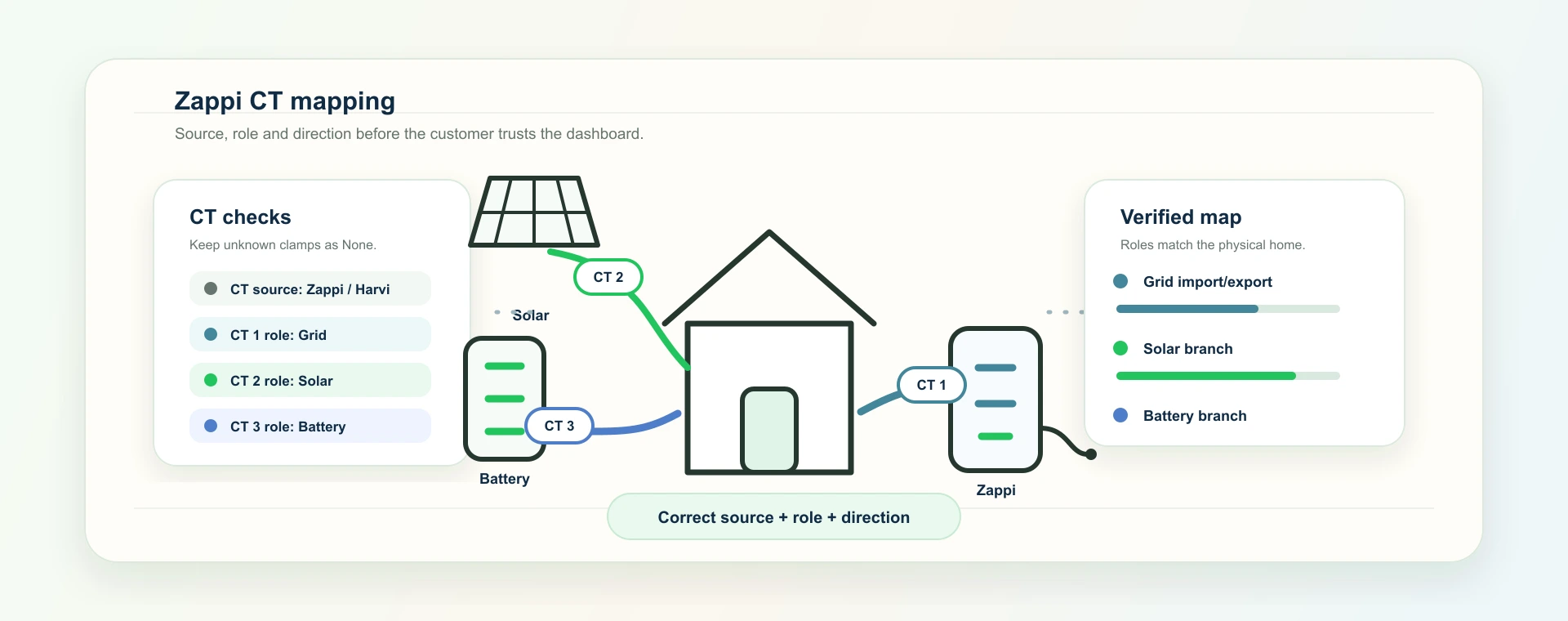
Connecting a zappi is not the same as understanding what its CT clamps are measuring.
That distinction matters in a solar battery home. A customer may have a Solis hybrid inverter, a home battery, a zappi EV charger and a tariff that changes through the day. Each device can report useful data, but the dashboard still needs to know which reading belongs to which physical part of the home.
This guide explains zappi CT mapping clearly: CT roles, CT direction, zappi versus Harvi source, why the mapping affects solar and battery dashboards, and what homeowners or installers should check before trusting the numbers.
It is not a wiring guide. CT clamps and electrical work should be checked by a competent installer or electrician. The aim here is to explain the software meaning of the map after the physical installation has been reviewed.
There is also an important electrical boundary: myenergi/zappi CT clamps measure AC circuits. They should not be described as reading DC battery current.
The quick version: zappi CT mapping in a battery home
zappi CT mapping tells the software what each current transformer clamp is meant to represent.
In a supported 1app.energy setup, that can include:
- grid import and export;
- solar generation measured outside the inverter;
- hybrid inverter branch behaviour;
- AC battery or battery-related branches where the installation is configured that way;
- unused CT inputs that should stay set to
None; - direction settings for CTs that read backwards.
The important point:
A zappi connection can prove the charger account is reachable. CT mapping helps prove what the charger readings mean.
Without that map, a dashboard may be connected but still confusing. It may show solar on a no-solar home, fold EV charging into normal home load, reverse import and export, or double-count a solar branch that is already measured by another source.
Why zappi CT readings matter after the API key works
The myenergi zappi API key setup guide covers the credential step: finding the gateway or hub serial number, generating the key and connecting the charger to 1app.energy.
That is necessary, but it is only the first layer.
Once the account is connected, the next question is:
Does the returned data describe the right physical circuit?
For a simple EV-only setup, charger state and session power may be enough. For a solar battery home, the same myenergi environment may also include CT clamps around grid, solar, battery or other circuits. Those readings can be valuable where configured, but they need context.
For example, a zappi may know that power is flowing through a CT clamp. That does not automatically mean the customer-facing app should treat the value as whole-home usage, solar generation or battery charge. The app needs the home topology, CT role and direction before the number becomes meaningful.
This is why the Solis, zappi and Octopus setup checklist treats zappi as EV context first, then asks whether CT roles are known.
What CT role means
A CT role is the label attached to a clamp.
In 1app.energy settings, supported zappi CT roles include:
| CT role | What it means |
|---|---|
None | This CT input is not being used for a meaningful reading |
Grid | The clamp is measuring grid import/export at the meter side |
Solar | The clamp is measuring a solar branch outside the inverter source |
Hybrid inverter | The clamp is measuring the inverter branch |
AC battery | The clamp is measuring an AC-coupled battery branch |
Battery branch | A battery-related AC-side branch in the software model where configured |
The exact right mapping depends on how the home is wired and how the installer has measured it. A three-phase Harvi setup may repeat the same role across multiple CTs. A single-phase home may use fewer inputs. A no-solar home should not invent a solar CT just because the product has a solar feature.
The safest default for an unknown CT is None.
That may feel conservative, but it protects the customer. An unset CT says "we do not know this branch yet". A wrongly mapped CT says "we are confident about the wrong thing".
Why CT direction matters
CT clamps also have direction.
If a mapped CT reads backwards, import can look like export, solar can look like demand, or battery discharge can look like charging. The numbers may still move, so the error can be harder to spot than a disconnected device.
Typical red flags include:
| What the customer sees | What may be wrong |
|---|---|
| Grid export shown when the home is clearly importing | Grid CT direction or sign convention needs review |
| Solar appears as a negative value during daylight | Solar CT direction may be reversed |
| Battery "charging" while the inverter app shows discharge | Battery branch direction may be wrong |
| Home load drops when the EV starts charging | EV load is being netted or mapped through the wrong source |
| A no-solar home shows solar movement | Topology or CT role was guessed instead of verified |
1app.energy settings include a direction option for every mapped zappi CT. Direction is not shown for unused CTs because there is nothing meaningful to reverse.
The practical validation is to compare a normal live moment against the physical home:
- turn on a known load and check the grid/home direction;
- start or stop EV charging and check that EV load moves in the expected place;
- compare daylight solar behaviour against the inverter or installer expectation;
- check that battery charge and discharge agree with the inverter source;
- confirm the dashboard does not show absent equipment as a zero-value feature.
zappi source: zappi or Harvi
Some installations take CT readings directly from the zappi. Others use a Harvi device to send CT readings wirelessly.
For the customer, the important detail is not the hardware brand name. It is the source of the CT readings.
If the CT source is unclear, the app may receive readings but still lack enough confidence to explain them. 1app.energy therefore keeps the CT source explicit in settings: Auto, zappi or Harvi.
Auto can be useful where the source can be inferred safely. Manual selection helps when an installer or support reviewer knows the physical layout and wants the software model to match it.
This is not a savings feature by itself. It is a trust feature.
The customer should be able to ask, "Where did this number come from?" and get an answer that matches the wiring.
The Solis, zappi and battery example
Consider a common supported home:
- a Solis hybrid inverter with solar and battery;
- a zappi EV charger;
- an Octopus tariff where supported, or manually entered rates for another tariff;
- one or more CT clamps around the grid or additional branches.
Solis may be the source for inverter, battery and solar behaviour. zappi may add EV charger state and CT readings where configured. Octopus may add tariff context where the account and tariff support it.
The dashboard should not flatten all of that into one generic energy number.
If the Solis inverter already reports PV generation, and a zappi CT also measures the same solar branch, those two values should not simply be added together. If the zappi CT measures external solar that the inverter does not see, that is different. The app needs the topology to know which case applies.
This is the same source-of-truth principle explained in home energy dashboard source of truth: what to check, but CT mapping is the installer-level detail that often decides whether the source map is correct.
Why CT mapping affects EV and battery behaviour
EV charging is where bad mapping becomes visible quickly.
If the zappi is treated only as a generic household load, the customer may not understand why the battery discharges when the car starts charging. If the charger is understood as EV context, the dashboard can show a clearer picture of where the demand is coming from.
That is especially important for homes dealing with the EV and battery conflict described in why your home battery can drain when Octopus charges your EV.
Where supported, verified and customer-enabled, 1app.energy can help coordinate battery and EV behaviour around tariff periods. But that control should sit on top of a clean data model. Credentials, CT roles, CT direction, device status, tariff source and customer settings all matter.
The zappi sensor wiring and protection settings in 1app.energy reflect that separation:
- CT source and CT roles describe the measurement layer;
- CT direction corrects readings that are physically reversed;
- peak-rate EV charging protection is a customer-enabled behaviour where supported;
- zappi control remains conditional on supported setup, live device state and customer permission.
In other words, the app should not pretend an EV control is safe just because a zappi API key was saved.
What homeowners should check before trusting zappi CT data
Homeowners do not need to become installers, but they should know what to ask.
Start with these questions:
- Which myenergi account owns the zappi and gateway?
- Is the connected charger the one at this property?
- Does the installation use CT clamps for grid, solar, inverter or battery readings?
- If Harvi is present, which CTs does it carry?
- Does each CT have a known role?
- Does each mapped CT read in the right direction?
- Does the dashboard hide equipment that is not actually installed?
Homeowners should not move CT clamps or change wiring to test this. The useful customer check is whether the dashboard story matches the installed system and whether the installer can explain the map.
Then use one normal day as a sanity check. A useful day has some solar generation, some battery movement, some normal home load, and ideally a short EV session.
Look for physical sense, not perfect second-by-second agreement. Cloud APIs can refresh at different times. Tariff data, inverter telemetry and charger telemetry may not arrive in the same instant. The goal is to prove that the direction, source and category of each value are right.
For broader validation, use the first-day checks in how to read your inverter data to spot energy waste.
What installers should hand over
The strongest handover is not just a list of apps and passwords.
For a zappi and battery home, the customer or support team should be able to recover the measurement map later. That handover should include:
- the myenergi account owner;
- the gateway or hub used for the API connection;
- whether CT readings come from zappi, Harvi or an inferred source;
- which CT number maps to grid, solar, hybrid inverter, AC battery or another AC-side battery-related branch;
- which CTs are unused;
- any direction reversals applied during commissioning;
- whether solar is measured through the hybrid inverter, an external CT, or both;
- whether EV charger control is enabled, unavailable or intentionally left manual.
That does not need to be complicated. A simple note such as "CT1 grid, CT2 external solar, CT3 unused, source Harvi, CT2 reversed" can save a lot of confusion later.
That information helps avoid repeat support calls. It also means a future tariff, battery or dashboard change can be reviewed against the actual wiring instead of guessed from a screenshot.
For Solis-focused installers, this is part of closing the customer software gap described in the Solis inverter software gap. The hardware can be solid, but the customer still needs a clear explanation of how the whole home behaves.
How 1app.energy uses this carefully
1app.energy is designed as a customer-facing SaaS layer for renewable homes: one app for solar, battery, EV and tariff.
For zappi homes, that does not mean every possible CT value should become a headline metric. It means supported myenergi data can be used in the right place, where the setup is verified and the customer enables the relevant behaviour.
The product approach is deliberately cautious:
- keep missing CT roles as
Nonerather than filling them from examples; - distinguish solar topology from zappi CT wiring;
- show EV charging context where supported;
- use tariff-aware behaviour only where the backend and customer settings allow it;
- avoid treating saved credentials as proof of a live connected device.
That is less flashy than a dashboard full of instant numbers, but it is better for trust. A renewable-home app should be honest about what it knows, what it can control, and what still needs verification.
Common questions about zappi CT mapping
Do I need zappi CT mapping to connect my charger?
Not always. A zappi connection can still provide useful charger context where supported. CT mapping becomes important when the home uses myenergi CT readings to explain grid, solar, battery or inverter behaviour.
Is a zappi grid CT the same as a smart meter reading?
No. A grid CT and a supplier meter can both describe grid flow, but they are different sources. They may refresh at different times and may not match perfectly at every instant. The useful check is whether import/export direction and broad behaviour agree.
Why does 1app.energy use None for unused CTs?
Because a missing measurement should stay missing. Showing a fake solar, battery or grid value from an unmapped CT would be more misleading than leaving that branch unset.
What if my solar is already measured by Solis?
Then the zappi solar CT should only be used if it measures a distinct external solar branch or the setup has been reviewed. If both sources describe the same solar generation, adding them together can double-count.
Can CT mapping fix every zappi or battery issue?
No. CT mapping can help clarify the measurement layer. It does not guarantee compatibility, control success, tariff outcomes or savings. Device status, permissions, battery settings, charger lock state, tariff setup and backend support still matter.
Should I change CT clamps myself?
No. Treat the physical clamp position and electrical setup as installer or electrician work. The customer-facing value is understanding what the map means and checking whether the dashboard reflects the installed system.
Should installers set up peak-rate EV protection for every home?
No. Peak-rate EV protection should be enabled only where the setup supports it and the customer wants that behaviour. Some homes may prefer manual control. Some homes may not have the tariff or device state needed for the feature to make sense.
Final thought on zappi CT mapping
zappi CT mapping is not the headline feature, but it is one of the details that makes a solar battery dashboard trustworthy.
The goal is not to show more numbers. The goal is to show the right numbers from the right source, with the right physical meaning.
For homeowners, that means fewer confusing energy stories. For installers, it means a cleaner handover. For supported 1app.energy homes, it gives the app a safer foundation for solar, battery, EV and tariff visibility.
Visit 1app.energy/signup to check your inverter and start signup.
Relevant smart controls
These mode pages are the closest product-side follow-on from the issue explained in this article.
Autopilot
The best starting mode for most homes. Autopilot charges when power is cheap, keeps battery back for the home, and can export spare battery power when prices are high.
Home First
A simpler home-first mode. It runs the home from your own solar and battery first and avoids automatic battery export.
Time-based Control
A simple schedule-based mode. Time-based Control charges the battery during your cheaper tariff periods until it reaches the battery target you set.
Does this sound like your home?
Your setup might already qualify.
Tell us which devices and tariff you are on. We review every request and invite in order of fit, not sign-up date.