Track Axle Energy credits and net daily cost in 1app.energy
Bring Axle Energy events into 1app.energy automatically, estimate VPP credit from measured export, and keep it separate from supplier export and net daily cost.
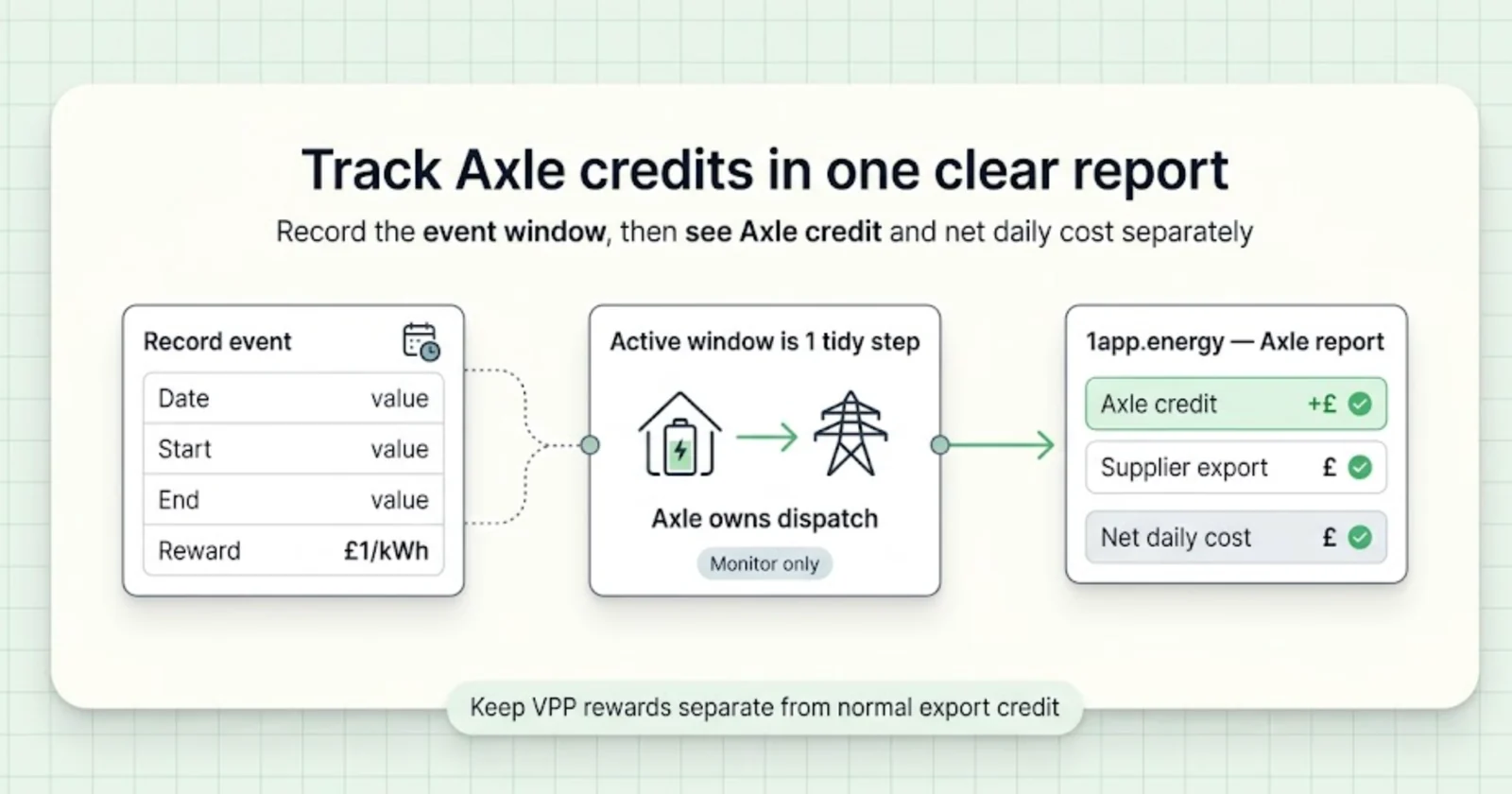
If you are enrolled in the Axle Energy VPP, the important question is not only whether your battery exported during an event.
The more useful question is:
What did that event do to my whole-home energy position?
1app.energy can help enrolled homes answer that question by bringing in Axle event windows, showing Axle Energy credit separately from supplier export credit, and keeping the event visible beside supported solar, battery, home-load and tariff context.
Axle still handles the VPP itself: joining, eligibility, payments and your Axle account. 1app.energy's job here is simpler. Once Axle is connected, the event windows arrive on their own, and the app helps you understand what happened in your home afterwards.
This guide is deliberately basic. It explains how Axle events get into 1app.energy, what the app can calculate from your home data, and what still needs to be checked in Axle.
If you are still deciding whether to join Axle, start with Axle Energy VPP: what home battery owners should check.
For the broader event journey, read Octopus Power Up, Power Down and 1app.energy Energy Events. It explains why supplier zero-price windows can use supported battery control or accounting-only treatment, while Axle remains the external owner of its VPP dispatch window.
The quick version
For an enrolled home, 1app.energy can help with four practical jobs:
- Bring in Axle Energy export events automatically once Axle is connected, or when you confirm an event from a dashboard prompt.
- Keep monitoring the home during an active Axle window and leave the dispatch to Axle, with a reserve-protected export fallback for supported Solis homes if the battery is not exporting.
- Calculate an in-app Axle credit from measured grid export inside the event window and the credit rate saved for the event.
- Report Axle Energy export and credit separately from normal supplier import, standing charge and export credit.
That separation matters. A normal export tariff payment and an Axle VPP reward are not the same thing, even if both relate to energy going to the grid.
The customer needs to see both.
For the wider principle, read home energy dashboard source of truth: what to check. Axle reporting works best when the customer can see which system owned which action.
Why Axle credits should be separate
Most battery dashboards are built around normal daily energy behaviour:
- grid import;
- grid export;
- solar generation;
- battery charge and discharge;
- large home loads;
- tariff cost;
- supplier export credit.
An Axle Energy event adds another layer. The battery may export because Axle has dispatched it for a grid event, not because your normal home schedule chose to sell energy.
If that reward is mixed into normal export credit, the day can become hard to understand. You may see a lower net cost, but not know whether it came from your tariff, your solar export, or the Axle event.
1app.energy keeps that distinction visible. Supplier import, standing charge and supplier export credit remain part of the normal daily cost view. Axle Energy credit is shown as a separate line where event windows are recorded and measured export is available.
What 1app.energy actually tracks
The Axle report is built from a small set of practical inputs and measured home data.
1app.energy tracks:
- the Axle event date, start time and end time, from your Axle connection or a confirmed dashboard prompt;
- the credit rate used for the in-app estimate;
- measured grid export during the recorded Axle window;
- the calculated in-app Axle Energy credit for that window;
- supplier import cost, standing charge and supplier export credit as separate daily-cost lines;
- the daily position after Axle Energy credit is shown separately.
That is different from logging into Axle and copying a payout statement. The 1app.energy number is a clear in-app report based on the event window, measured export and saved credit rate. Your official payment, referral status and settlement still belong to Axle.
This distinction matters because it keeps the report useful without pretending that the app owns the VPP.
Step 1: connect Axle so events come in automatically
Axle events can arrive automatically, be confirmed from a dashboard prompt, or be added manually from your event notice:
-
Your Axle connection. In 1app.energy, open Devices, choose Axle Energy and paste the Home Assistant token from your Axle account. Once connected, Axle export events are added automatically. The token steps are in how to connect Axle Energy to 1app.energy.
-
A dashboard prompt. When 1app.energy knows about an Axle event, your dashboard can ask you to confirm it. Choose Add event if it matches your Axle email, adjust the time or rate first if it does not, or choose Not enrolled if your home is not in the programme.
-
Manual entry. Open Settings, then Energy Events, and choose Add event. Enter the date, start and end times, and reward rate from your Axle notice, or paste the email to fill the details. Check them before choosing Save event. Times use your home's timezone, and an event can last up to 4 hours.
The Axle card is always available under Settings, Energy Events. You do not need to connect Axle first: adding your first event there turns Axle on for your home. Only add events if your home is enrolled with Axle. The card lists your upcoming and past Axle events, newest first. You can cancel a manually entered event before it starts; this removes the entry from 1app.energy and does not cancel the event with Axle. Automatically imported events stay managed by the Axle connection.
The event window is the boundary that tells 1app.energy: this period belongs to a third-party dispatch programme. That helps the app report the event later. It also helps avoid two apps trying to move the battery in opposite directions during the active window.
Step 2: let Axle own the dispatch window
Two systems should not fight over the same inverter at the same time.
During an active Axle export event, 1app.energy keeps monitoring the home and does not charge the battery. Axle runs the event. For supported Solis homes with Smart Control on, there is one safety net: if the battery is not exporting at full rate five minutes into the event, 1app.energy can start the export itself so the event is not missed. It stops at your battery reserve, and once Axle is exporting at full rate, 1app.energy only watches.
That distinction protects clarity. The app can still show what happened, but it never moves the battery in the opposite direction while the external VPP event is active.
This does not guarantee that Axle will accept the home, dispatch the battery, or pay a particular amount. Those decisions belong to Axle. The 1app.energy role is to keep the event visible, avoid app conflict and help you review the whole-home result.
Step 3: review the Axle dispatch report
After an event, the Energy Reports view can show an Axle Energy dispatch section. This is where the event becomes easier to audit.
The report can show:
- grid exported during Axle windows;
- Axle Energy credit;
- number of event windows;
- average credit rate;
- period trend for Axle dispatch.
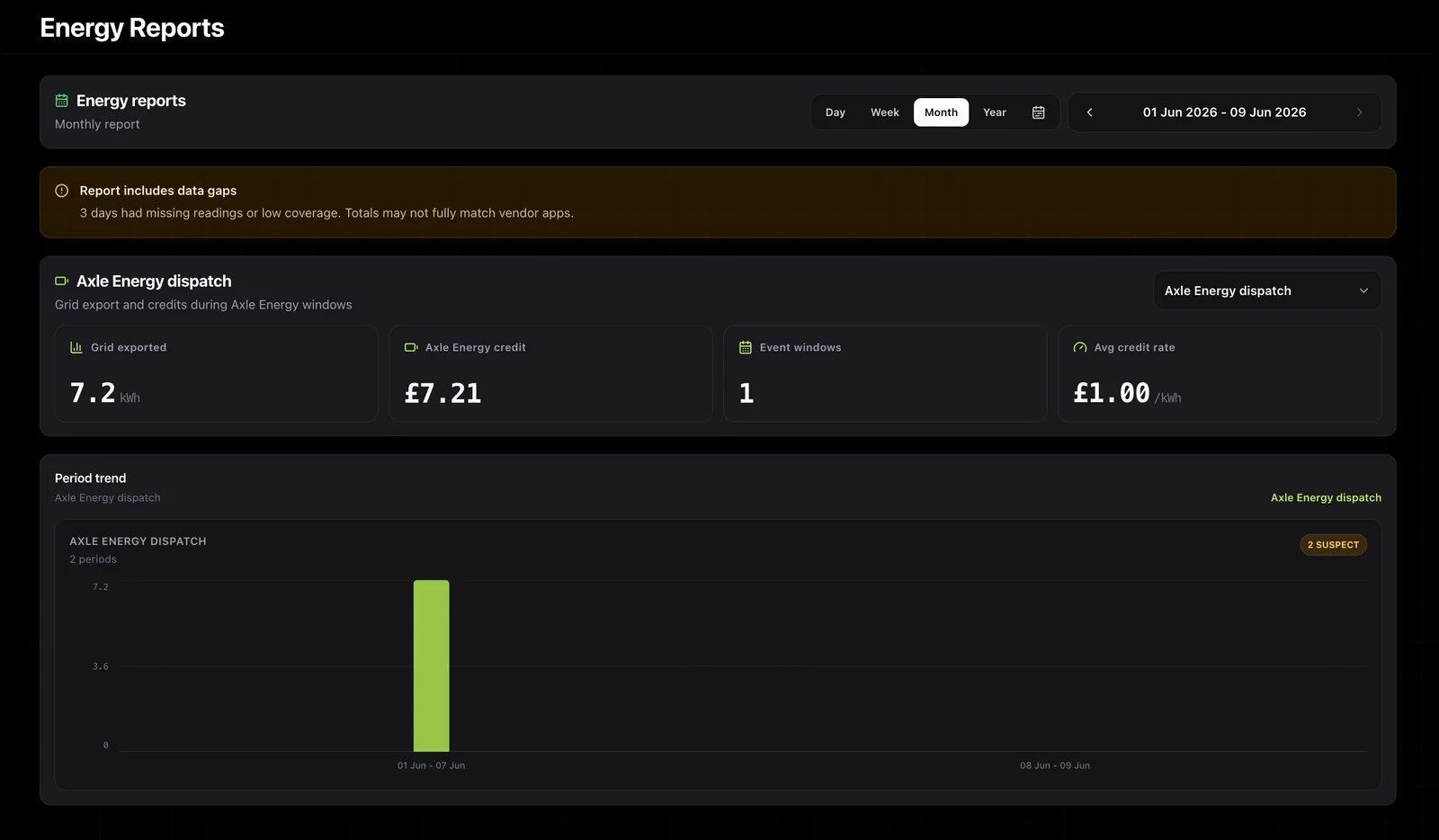
If the report flags data gaps, treat the result with care. Missing or low-coverage readings can make totals differ from vendor apps or official VPP statements. That is why the report separates the Axle view from normal tariff cost rather than hiding it inside one blended number.
Step 4: read net daily cost after Axle credit
The daily cost view shows why this matters to the end user.
In the example below, the normal daily cost calculation still has separate lines for import energy, standing charge and supplier export credit. Axle Energy credit is then shown as its own additional credit, followed by the effective cost position after Axle Energy credit.
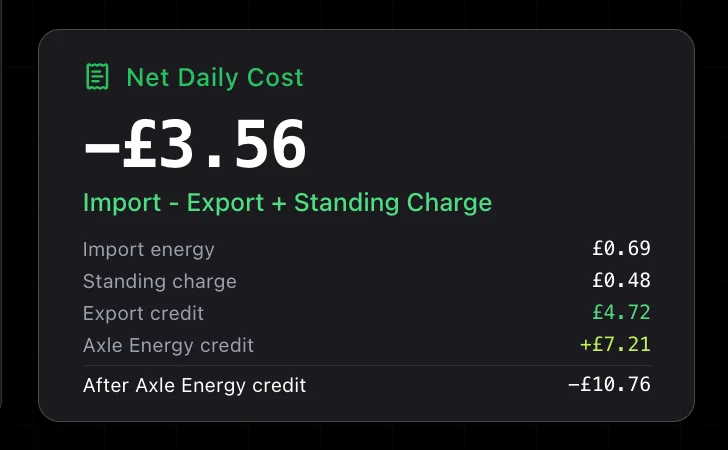
This gives the customer a clearer picture:
- what the supplier-side day looked like;
- what Axle added on top;
- whether the event changed the effective daily position;
- whether the result is worth reviewing against battery reserve, home load and later import.
That is more helpful than looking at a headline event rate on its own.
If you want the wider export decision framework, read home battery export checks before selling stored energy. It explains why battery export should be judged against reserve, tariff and later import, not just the export price.
What this helps you answer
Axle events can be useful, but the event payment is only part of the story.
A 1app.energy report can help you ask better questions after the event:
- Did the battery export during the recorded window?
- How much credit did that create at the recorded rate?
- Did the home import later at an expensive time?
- Was the battery still above the reserve floor afterwards?
- Was a large home load running during the event?
- Did normal control behaviour resume after the event?
- Did the whole-home cost position improve?
The point is not to make every event look good. The point is to make the event understandable.
What still belongs in Axle
1app.energy reporting is not your Axle payout record.
You should still use Axle for:
- checking whether your battery can join;
- event terms;
- payment and referral status;
- Axle account access;
- any issue where Axle did not dispatch, reset or settle as expected.
You should also keep your installer, DNO/export-limit paperwork and battery warranty limits in mind. A VPP event still sits inside the physical and contractual limits of the home.
For the paperwork side, read G98, G99 and G100 forms: UK solar and battery DNO guide.
How this fits with Smart Control
1app.energy Smart Control is about supported, customer-enabled battery behaviour around the whole home: tariff timing, reserve, home demand and supported inverter controls.
Axle has a different job. It dispatches batteries for grid events.
For Axle event windows, the cleanest model is:
- Axle dispatches during the event.
- 1app.energy keeps monitoring the home and does not charge the battery during the event.
- For supported Solis homes with Smart Control on, 1app.energy starts the export only if the battery is not exporting at full rate after five minutes, and stops at the battery reserve.
- The customer reviews the result afterwards in reports and daily cost.
Outside an Axle event window, your normal supported 1app.energy setup can continue according to the control mode and device support available for your home.
If you are choosing a control mode, read which 1app.energy Smart Control mode should you use?. If your concern is export value, read home battery export checks before selling stored energy.
Common questions about Axle credit tracking
Do I still need my Axle account?
Yes. You still use Axle to join the programme, check whether your battery is eligible, and see what gets paid.
Your Axle account also gives you the Home Assistant token that connects Axle to 1app.energy. 1app.energy then brings in the Axle event windows and reports the home energy result around them.
How does 1app.energy calculate Axle Energy credit?
The app uses the Axle event window, measured grid export during that window and the credit rate saved for the event. It then shows the result as an in-app Axle Energy credit, separate from supplier export credit.
Axle's event data does not include a payment rate, so events that arrive through the Axle connection use a standard £1.00/kWh for this estimate. An event you confirm from a dashboard prompt uses the rate shown in the prompt, which you can adjust before saving. Check your Axle statement for the amount actually paid.
Do I need to add Axle events myself?
Usually not. Connect Axle in Devices with your Axle Home Assistant token and export events are added automatically. If 1app.energy shows an Axle event prompt on your dashboard, confirm it with Add event. If an event is missing, you can enter it or paste the notice under Settings, Energy Events. Check the date, times and reward rate before saving.
Does this conflict with Axle?
The point is to reduce conflict. During an active Axle export window, 1app.energy keeps monitoring the home and does not charge the battery. On supported Solis homes with Smart Control on, it only starts an export if the battery is not exporting at full rate five minutes into the event, and it stops at the battery reserve.
You should still treat Axle as the service that owns the VPP event itself.
Is the Axle credit in 1app.energy the official amount?
No. It is an in-app estimate based on the event windows, measured export and the saved credit rate. Your payment and referral status still belong to Axle.
Why keep Axle credit separate from supplier export credit?
Because they answer different questions. Supplier export credit belongs to your energy supplier tariff. Axle credit relates to an Axle VPP event. Keeping them separate makes it easier to see whether the event improved the whole day, rather than hiding everything in one net number.
Can this maximise my Axle revenue?
It can help you understand the result and avoid obvious control confusion, but it should not be treated as a guaranteed revenue maximiser. Battery revenue depends on eligibility, event timing, actual export, tariff, reserve, import cost, device behaviour and Axle's terms.
Final thought
Axle Energy can make a home battery more useful by letting it support the grid during events. But the customer still needs to understand the whole home.
1app.energy helps by making Axle windows visible, keeping Axle credit separate from supplier export credit, and showing the effective daily cost after the event.
That is the useful outcome: not just "did the battery export?", but "did this event make sense for my home?"
Visit 1app.energy to start early-access onboarding and see whether your solar, battery, tariff and connected-home setup is a good fit for supported whole-home visibility and Smart Control.
Does this sound like your home?
Your setup might already qualify.
Choose your inverter to start. Supported homes create an account straight away; other setups join the compatibility list.