Honest comparison for solar and battery homes

1app.energy vs SolisCloud: which job belongs where?

Use SolisCloud to set up and manage your Solis system. Use 1app.energy day to day to see how solar, battery, EV charging and tariff work together.

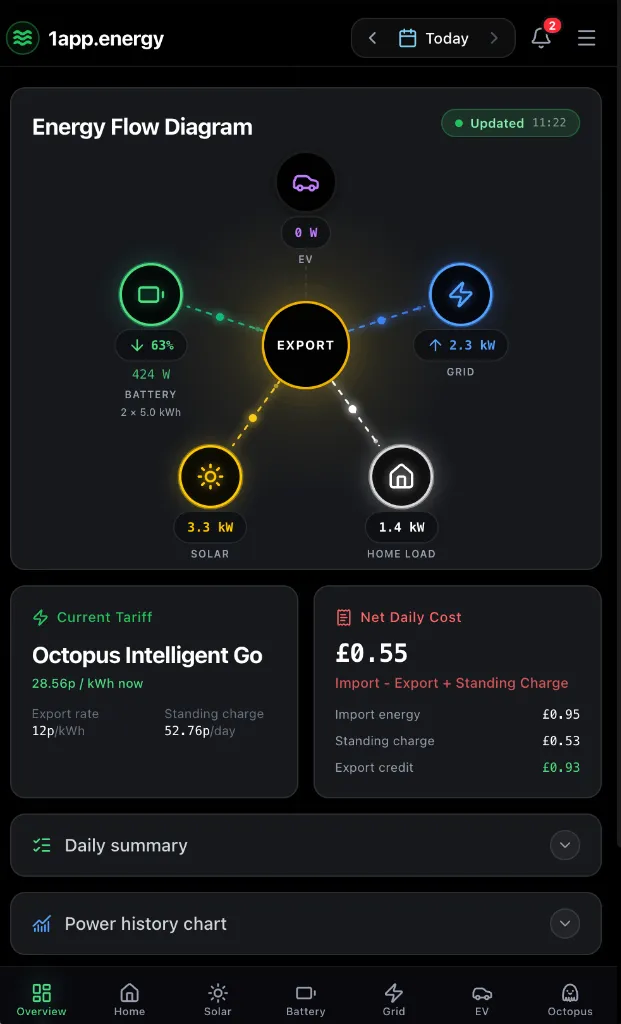
1app.energy mobile dashboard showing whole-home energy flow
The 1app.energy view depends on connected devices, available measurements and the selected date.

The quick answer

Use both, but give each app the right job.

Keep SolisCloud for commissioning, fault details, diagnostics and advanced inverter settings. Use 1app.energy to understand where the home's energy came from, where it went and what the day cost. On supported and verified systems, customer-enabled Smart Control can also help plan battery behaviour around tariffs and reserve needs.

Choose by task

Where each app earns its place

SolisCloud logo

Best for

Use SolisCloud for

Commissioning and local setup

SolisCloud is the right place to bind the plant, configure compatible equipment and complete Solis-specific setup.

Alarms and diagnostics

Manufacturer tools cover Solis faults, health checks and technical diagnostic detail that 1app.energy does not try to replace.

Detailed inverter settings

Available controls and permissions vary by model and account, but SolisCloud remains the primary technical interface.

1app.energy logo

Best for

Use 1app.energy for

One view of the home

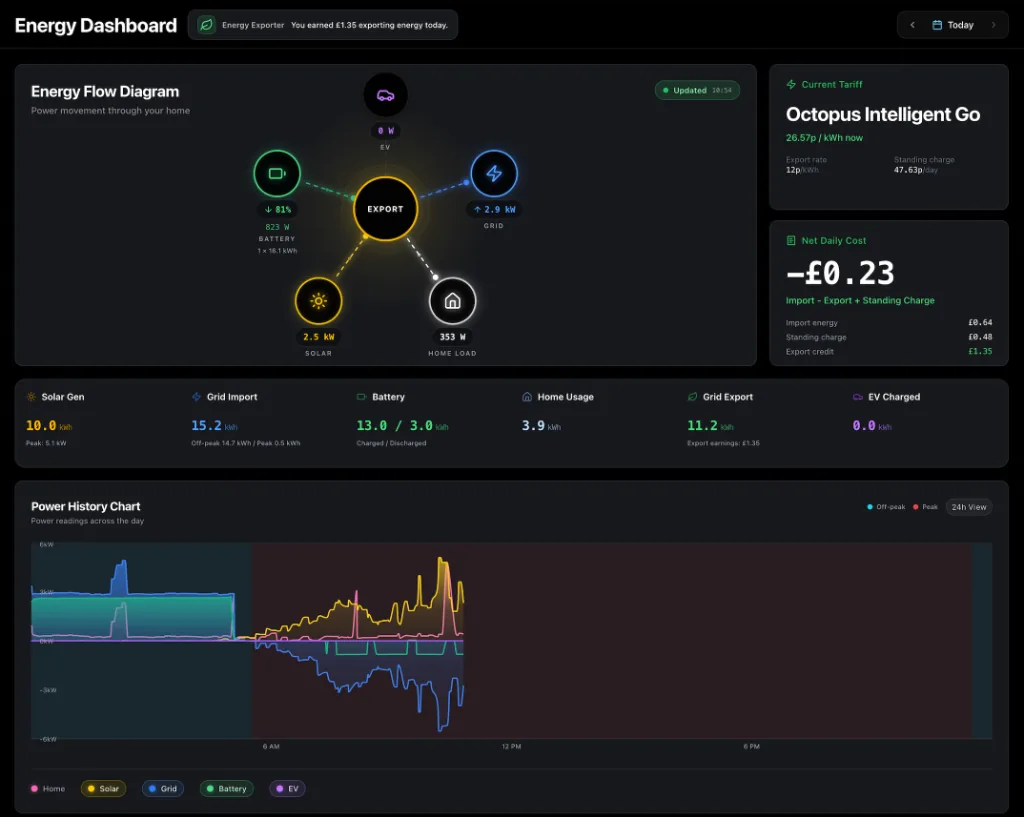
Bring supported solar, battery, EV, grid and tariff data into one customer-facing dashboard.

Understand the daily energy result

See import cost, standing charge and export credit beside estimated energy destinations calculated from connected readings when measurements support it.

Optional tariff-aware Smart Control

Plan battery behaviour around cheaper periods, reserve protection and home demand on supported, verified systems where control is customer-enabled.

Capability by capability

A comparison without false checkmarks

The useful question is not which app has more features. It is which app is better suited to the job in front of you.

Initial Solis setup

SolisCloud logoSolisCloud
Primary tool for commissioning, logger networking, plant binding and compatible Solis parameters.
1app.energy logo1app.energy
Not a replacement for commissioning. Connect after the supported Solis system is working correctly.

Alarms and technical diagnostics

SolisCloud logoSolisCloud
Manufacturer-level alarms, fault detail, repair guidance and technical health tools.
1app.energy logo1app.energy
Keep SolisCloud for this job. 1app.energy focuses on the customer view of the wider home.

Live energy view

SolisCloud logoSolisCloud
Real-time Solis plant data and power flow for the equipment available to the account.
1app.energy logo1app.energy
A joined-up view of supported solar, battery, EV, grid and tariff data for the home.

Daily financial context

SolisCloud logoSolisCloud
SolisCloud includes plant yield and earnings tools within the Solis platform.
1app.energy logo1app.energy
Import cost, standing charge, export credit and net daily cost using the available tariff data.

Battery control

SolisCloud logoSolisCloud
Detailed Solis operating modes and battery settings, subject to model and account permissions.
1app.energy logo1app.energy
Optional tariff-aware behaviour for supported, verified systems where the customer enables control.

EV and tariff context

SolisCloud logoSolisCloud
The Solis plant and its manufacturer controls remain the centre of the experience.
1app.energy logo1app.energy
Supported EV charging and tariff timing can sit beside the Solis battery and whole-home result.

Real decisions

Which app should you open?

You are setting up or diagnosing the inverter

Open SolisCloud. It is the manufacturer tool and has the technical context needed for the Solis system.

You want to know why yesterday cost more

Open 1app.energy to review the home's import, export, battery, EV and tariff data together for that day.

You want the battery to respond to tariff timing

Use 1app.energy Smart Control only when the Solis system is supported, verified and customer-enabled. Keep SolisCloud available for manufacturer settings.

What to know first

Honest limits matter

Compatibility, data quality and control readiness depend on the equipment and account connected to the home.

  • 1app.energy supports selected Solis hybrid systems. Unknown, grid-tie-only or unverified systems may remain monitoring-only.
  • Available data and control depend on the inverter model, firmware, account permissions and the quality of the connected measurements.
  • Live data can be delayed by the manufacturer cloud. 1app.energy marks incomplete or delayed readings rather than presenting them as current.
  • SolisCloud is still needed for commissioning, firmware, detailed alarms, warranty support and manufacturer-specific settings.
  • Smart Control is available only on supported, verified Solis systems where it is customer-enabled.

Common questions

Straight answers before you choose

Does 1app.energy replace SolisCloud?

No. SolisCloud remains the primary manufacturer platform for setup, alarms, diagnostics and detailed Solis settings. 1app.energy adds the wider home-energy and tariff context.

Can 1app.energy control a Solis battery?

On supported and verified Solis hybrid systems, customer-enabled Smart Control can help plan battery charging, reserve and export behaviour. Unsupported or unverified systems remain monitoring-only.

Which app should I check every day?

Use 1app.energy for the joined-up home view and daily outcome. Use SolisCloud when you need Solis-specific alarms, diagnostics or technical settings.

Do I need new hardware?

No additional hardware is required when the existing SolisCloud-connected system passes compatibility checks during onboarding.

Sources and review

Claims you can check

Reviewed 9 July 2026

Native-app capabilities are taken from official vendor sources. 1app.energy capabilities are limited to supported devices, available evidence and customer-enabled settings. Product features can change, so this page is reviewed rather than treated as permanent fact.

See whether your home is supported

Keep the specialist apps. Add one clearer view of the home.

Start early-access onboarding and tell us which inverter, EV charger and tariff you already use.

Start onboarding