Honest comparison for heat pump homes

1app.energy vs MELCloud: native heat-pump control or whole-home monitoring?

Use Mitsubishi's MELCloud or MELCloud Home for heat-pump setup and direct control. Use 1app.energy to place supported Mitsubishi monitoring beside solar, battery, grid, EV and tariff data.

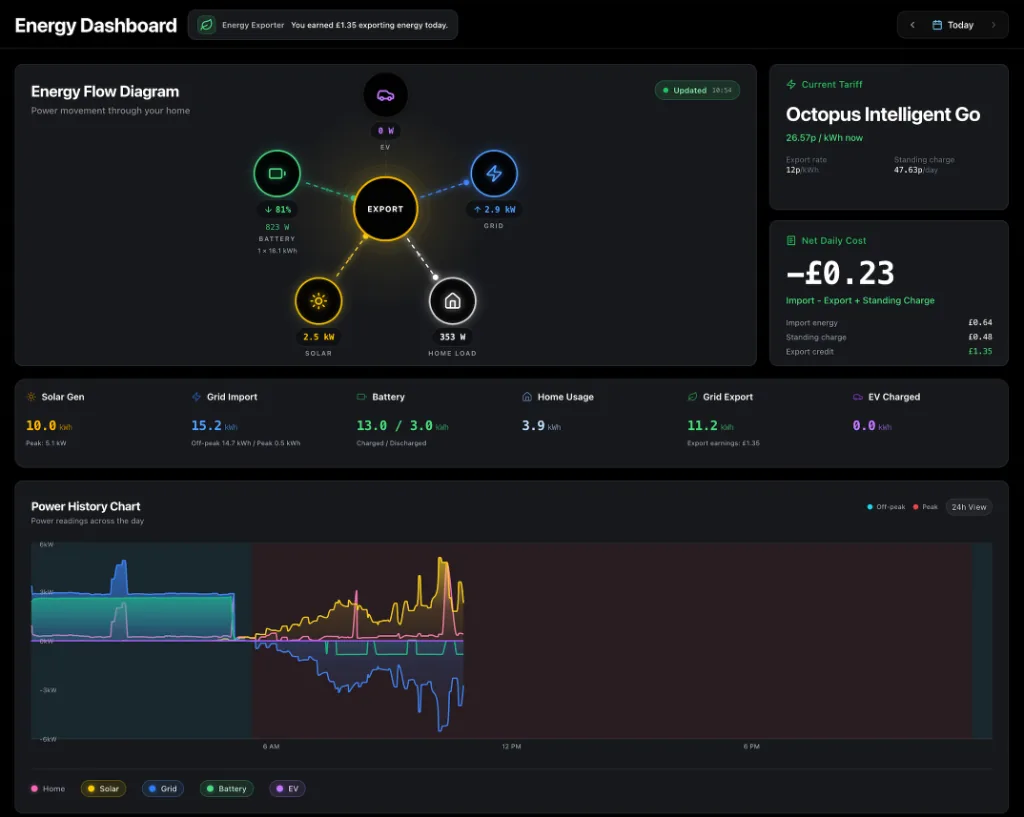
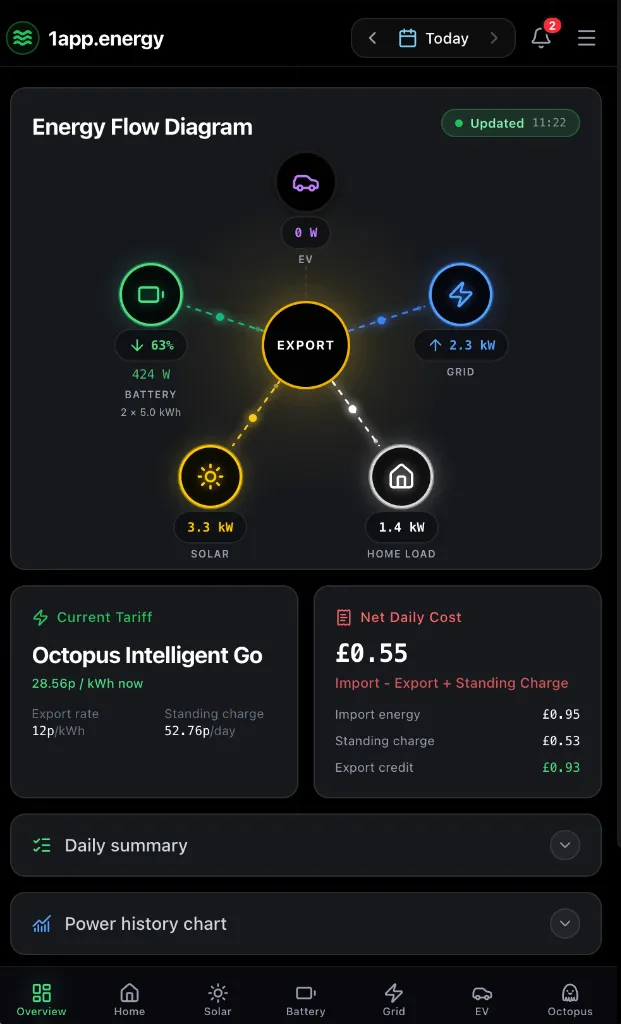
1app.energy mobile dashboard showing whole-home energy flow
The 1app.energy view depends on connected devices, available measurements and the selected date.

The quick answer

Use both, but give each app the right job.

Keep MELCloud or MELCloud Home for setup, schedules, direct heat-pump control, Mitsubishi diagnostics and support. Connect a compatible Mitsubishi system to 1app.energy for monitoring only, so provider-backed heating status can sit beside the home's other supported energy data. 1app.energy does not send commands to Mitsubishi heat pumps.

Choose by task

Where each app earns its place

MELCloud logo

Best for

Use MELCloud for

Mitsubishi setup and connection

MELCloud and MELCloud Home are the native services for pairing compatible Mitsubishi equipment, managing account access and completing product-specific setup.

Comfort settings and schedules

Use the Mitsubishi-native app for temperatures, hot-water settings, operating modes, scenes and schedules supported by the connected equipment.

Diagnostics and Mitsubishi support

The native service owns Mitsubishi error information, product guidance, firmware context and the route to installer, service and warranty support.

1app.energy logo

Best for

Use 1app.energy for

Heating in the whole-home view

Place supported Mitsubishi operating status, temperatures, demand, warnings and performance beside separately connected solar, battery, grid, EV and tariff data.

Provider-backed fields only

Show values only when the connected Mitsubishi cloud service supplies them, with unavailable energy or performance fields left unestimated.

Monitoring without control permission

Connecting Mitsubishi gives 1app.energy a monitoring role. Heat-pump settings and commands stay in MELCloud or MELCloud Home.

Capability by capability

A comparison without false checkmarks

The useful question is not which app has more features. It is which app is better suited to the job in front of you.

Account and device setup

MELCloud logoMELCloud
Primary route for registering compatible Mitsubishi equipment, configuring connectivity and managing account access.
1app.energy logo1app.energy
Connect after the system is working in MELCloud or MELCloud Home, then verify the account and select the correct device for this home.

Schedules and direct control

MELCloud logoMELCloud
Manage supported temperatures, modes, hot water, scenes and schedules in the Mitsubishi-native workflow.
1app.energy logo1app.energy
Monitoring only. 1app.energy does not change Mitsubishi temperatures, modes, schedules, hot water or on/off state.

Operating status and temperatures

MELCloud logoMELCloud
Shows the Mitsubishi equipment and comfort fields available for the compatible product and interface.
1app.energy logo1app.energy
Shows selected provider-backed status, temperature, demand, warning and hydraulic fields when the connected cloud service supplies them.

Energy and performance data

MELCloud logoMELCloud
Native energy history and performance availability depends on the Mitsubishi product, interface, cloud service and data period.
1app.energy logo1app.energy
Displays supported provider-backed performance evidence. Missing current-day electricity, delivered heat, hot-water energy or COP is not estimated.

Solar, battery, EV and tariff context

MELCloud logoMELCloud
The native apps focus on the Mitsubishi climate equipment and the measurements available to that service.
1app.energy logo1app.energy
Places supported heating monitoring beside separately connected home-energy evidence so the heat pump is not viewed in isolation.

Faults, servicing and warranty

MELCloud logoMELCloud
Use Mitsubishi Electric, the installer and the native app for product faults, servicing, firmware and warranty questions.
1app.energy logo1app.energy
Can show supported warning context but does not replace Mitsubishi diagnostics, an installer or manufacturer support.

Real decisions

Which app should you open?

You want to change a temperature or schedule

Use MELCloud or MELCloud Home. Direct Mitsubishi controls and schedules stay in the native app.

You want to understand heating beside the rest of the home

Use 1app.energy to review available Mitsubishi monitoring beside separately connected solar, battery, grid, EV and tariff data.

The heat pump reports a fault or needs service

Use MELCloud or MELCloud Home and contact the installer or Mitsubishi Electric support for device-specific diagnosis and service.

What to know first

Honest limits matter

Compatibility, data quality and control readiness depend on the equipment and account connected to the home.

  • Mitsubishi compatibility depends on the installed equipment, interface, cloud service, account access and the data fields that service exposes.
  • 1app.energy provides Mitsubishi monitoring only and does not send heat-pump commands.
  • Keep MELCloud or MELCloud Home for setup, schedules, direct control, diagnostics, servicing, firmware and warranty workflows.
  • Missing current-day electricity, delivered heat, hot-water energy or COP remains unavailable rather than being estimated.
  • Whole-home conclusions depend on separately connected battery, solar, grid, EV and tariff measurements for the property.

Common questions

Straight answers before you choose

Does 1app.energy replace MELCloud or MELCloud Home?

No. Keep the Mitsubishi-native app for setup, schedules, direct control, diagnostics and support. 1app.energy adds supported monitoring to the whole-home view.

Can 1app.energy control my Mitsubishi heat pump?

No. Use MELCloud or MELCloud Home for every Mitsubishi heat-pump control, including temperatures, modes, schedules, hot water and on/off changes.

Can every Mitsubishi heat pump connect?

No. Compatibility depends on the equipment, interface, Mitsubishi cloud service, account access and the fields available for that system.

What does Mitsubishi monitoring add to 1app.energy?

It can place supported heat-pump status, temperatures, demand, warnings and performance beside the home's other connected energy data without giving 1app.energy heat-pump control.

Sources and review

Claims you can check

Reviewed 20 September 2026

Native-app capabilities are taken from official vendor sources. 1app.energy capabilities are limited to supported devices, available evidence and customer-enabled settings. Product features can change, so this page is reviewed rather than treated as permanent fact.

See whether your home is supported

Keep the specialist apps. Add one clearer view of the home.

Start early-access onboarding and tell us which inverter, EV charger and tariff you already use.

Start onboarding