# Octopus Power Up, Power Down and 1app.energy Energy Events
How Octopus Power Up, Power Down and eligible EDF zero-price events work in 1app.energy, from customer acceptance to battery control and 0p accounting.
By 1app.energy Team
Published: 2026-05-01
URL: https://1app.energy/blog/octopus-power-up-saving-sessions-uk
Tariff rates, eligibility rules and device integrations change over time. Unless a section says otherwise, numeric examples in this article are illustrative worked examples rather than a quoted supplier promise.
 In a May 2026 customer update, Octopus Energy said more chances to use **free or cheaper electricity** were expected, alongside more chances to get rewarded for easing off during busy grid periods.
If you have a home battery, an electric car, or even a heat pump, this can be useful. Here is what is happening and how to think about it.
## What is changing with Octopus Power Up and Power Down
In recent years, Octopus customers have seen a few related schemes:
- **Saving Sessions.** Short windows where eligible customers could be paid to use less electricity, typically early evenings when the grid is under strain.
- **Free Electricity sessions.** Short windows where eligible Octopus customers were offered free electricity, usually when there was loads of wind and solar and not enough demand to use it.
As of 17 June 2026, Octopus's public [Saving Sessions page](https://octopus.energy/saving-sessions/) explains the idea around two actions: **Power Up** and **Power Down**.
In a May 2026 customer update, Octopus Energy said more chances to use **free or cheaper electricity** were expected, alongside more chances to get rewarded for easing off during busy grid periods.
If you have a home battery, an electric car, or even a heat pump, this can be useful. Here is what is happening and how to think about it.
## What is changing with Octopus Power Up and Power Down
In recent years, Octopus customers have seen a few related schemes:
- **Saving Sessions.** Short windows where eligible customers could be paid to use less electricity, typically early evenings when the grid is under strain.
- **Free Electricity sessions.** Short windows where eligible Octopus customers were offered free electricity, usually when there was loads of wind and solar and not enough demand to use it.
As of 17 June 2026, Octopus's public [Saving Sessions page](https://octopus.energy/saving-sessions/) explains the idea around two actions: **Power Up** and **Power Down**.
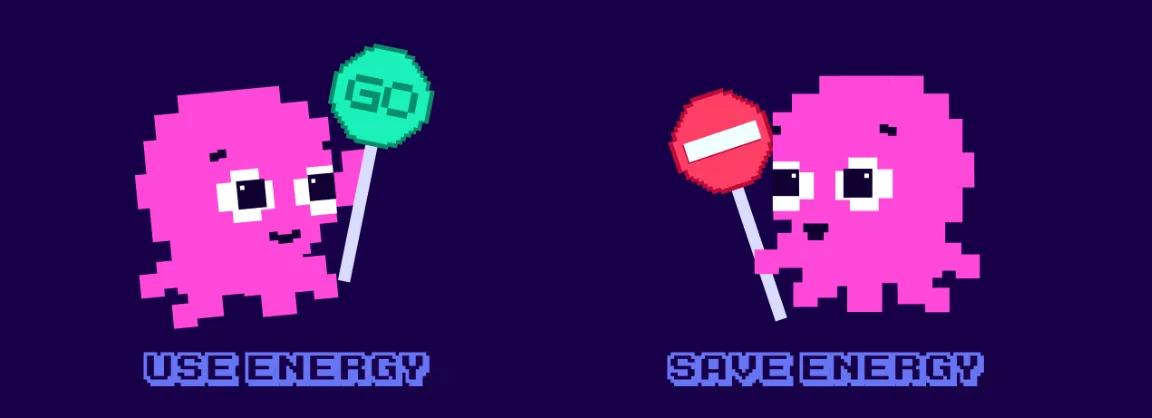 - **Power Up** = "use energy now, it may be free or cheaper." These are the windows when there is too much green electricity in the system and not enough homes using it. You might run the dishwasher, charge the car, fill the battery, or put the heating on a bit harder if the session terms and your setup make that sensible.
- **Power Down** = "ease off if you can, we will pay you for it." These are the busy hours when everyone is cooking dinner, the wind has dropped, and the grid is leaning on expensive gas power stations.
Some sessions can be national and some can be regional, depending on where the grid needs help. The important bit is the direction of travel: homes are increasingly being rewarded for shifting demand, not just for using less overall. In that May 2026 update, Octopus said signed-up Octoplus Saving Sessions customers did not need to do anything yet and it would share more detail before the new sessions start.
## Why the grid wants Power Up and Power Down sessions
In its May 2026 messaging, Octopus told customers that Britain spent **GBP 1.5 billion in 2025 switching off wind turbines and switching on gas instead**, because the grid did not have enough demand in the right places at the right times to soak up all the wind power. The fix is to give people a reason to use that spare clean power instead of throwing it away.
As of early May 2026, Octopus said its customers had earned **GBP 5.8 million** through Saving Sessions and unlocked **GBP 4.6 million** worth of free power through Free Electricity sessions. Its [Free Electricity page](https://octopus.energy/free-electricity/) also said that in 2025 customers had 15 sessions and 19 hours of free electricity. These figures can change, but the pattern is clear: the windows can be valuable for people who can actually catch them.
The point is not one headline figure. The point is that flexibility is becoming a real household asset.
## The honest catch for Octopus Saving Sessions
Power Up and Power Down sessions are usually short, often **one or two hours**, and they get announced with not much notice. They land at times that suit the grid, not your diary:
- A **Power Up** window might fall on a Tuesday lunchtime, or 3pm on a Sunday, or 11pm on a windy Thursday.
- A **Power Down** window might be 5pm to 6:30pm on a freezing weekday.
Most people are at work, picking the kids up, cooking, or asleep when these windows happen. Even if you really want to take part, it is hard to catch them by hand, especially Power Up windows, which go to waste unless something in your home is ready to fill up.
There is also a practical admin point: these sessions usually require you to opt in through Octopus or Octoplus before the event. Automation can help your home respond, but you still need to accept the session terms inside Octopus when required.
This is where having a home battery, an EV charger, or both, **can make the windows more useful**, but only if something is watching the windows and helping the home act at the right time.
## How a home battery can turn Octopus sessions into practical value
If you have a home battery, a Power Up window may be a chance to **fill the battery from the grid at a low effective cost**, and a Power Down window may be a chance to **run more of your home from the battery instead of the grid** while demand is high. The result depends on the session terms, your baseline, your battery size, charge rate, export rules and control setup.
Imagine a typical Tuesday:
- 1pm: Octopus announces a Power Up window for 2pm to 3pm because the wind is strong and the country is not using enough.
- 2pm: your battery starts filling from the grid while the session is active.
- 3pm: it stops, closer to full depending on battery size, charge rate and limits.
- 5pm to 6:30pm: a Power Down window is announced. Your battery helps power the home, reducing grid import, and Octopus may credit your account if you opted in and beat the session baseline.
Done by hand, that means watching your phone, opening the SolisCloud or manufacturer app, changing the schedule, remembering to change it back. Most people will not do this every day. Most people will miss most of the windows. (We have written about this exact problem in [why Octopus Intelligent Go can quietly drain your home battery](/blog/octopus-intelligent-go-what-happens-to-your-battery), the same logic applies to Power Up and Power Down windows.)
Done with supported controls, the home can be readier before the window starts instead of relying only on you to remember.
## How Energy Events work in 1app.energy
1app.energy has an **Energy Events** area for supplier-announced zero-price windows. It supports confirmed Octopus and EDF events where the supplier matches the tariff provider saved for that installation.
The customer remains in control of acceptance. A typical journey is:
1. **The supplier announces the event.** Check the exact window and accept any supplier terms or opt-in inside the supplier's own service when required.
2. **Review the event in 1app.energy.** A matching customer may receive an event prompt, or add the supplier-announced date and time manually.
3. **Confirm the exact window.** Adding the session records the start, end, supplier and 0p import rate. It does not enrol you with the supplier.
4. **See the confirmed automation status.** 1app.energy checks the installation before claiming automatic control.
5. **Review the result with the right accounting.** Once accepted, the exact event window can be treated as 0p import in 1app.energy's tariff accounting where the event authority is available.
For an eligible Solis hybrid battery home, automatic response requires a live supported Solis connection, Autopilot, automation control, export consent, matching supplier data and the required Smart Control entitlement. If those checks pass, 1app.energy can schedule supported battery behaviour for the accepted window.
If they do not pass, a matching-supplier event can still be saved as **accounting only**. In that state, 1app.energy records the exact 0p window but makes no inverter changes. The customer uses the inverter or supplier app if they want to change battery behaviour.
This distinction matters. Seeing an Energy Event does not prove that battery control is ready, and saving a manual event does not silently enable inverter writes.
If you are not sure which 1app mode is right for your home, the [smart control mode guide](/blog/which-1app-smart-control-mode-should-you-use) walks through the options.
## EDF zero-price events and smart charging are different
Eligible EDF zero-price events can use the same Energy Events journey when the home's tariff supplier is EDF. The customer confirms the event window, then 1app.energy records it for supported accounting and shows whether automatic battery control or accounting-only handling applies.
That is separate from EDF smart charging. EDF and its Kraken platform create the eligible EV charging schedule. 1app.energy can read provider-created dispatch context for a connected eligible home and coordinate supported battery behaviour around those windows where Smart Control is enabled. It does not create or replace EDF's charging schedule.
Read the [EDF Energy integration overview](/integrations/edf-energy) or the [EDF GoElectric smart charging and home battery guide](/blog/edf-goelectric-smart-charging-home-battery) for that separate flow.
## Where Axle Energy fits in the Energy Events journey
Axle VPP events are also energy events, but they have a different owner and a different accounting model.
- **Octopus or EDF zero-price event:** the supplier announces a 0p import window; the customer adds or accepts it in 1app.energy; supported Solis Autopilot control may respond, or the event remains accounting only.
- **Axle Energy event:** Axle owns the external battery dispatch, and the events come in from the Axle connection or a confirmed dashboard prompt; 1app.energy keeps monitoring and does not charge the battery during the window (on supported Solis homes it starts the export only if the battery is not exporting at full rate after five minutes, stopping at the battery reserve), and can show a calculated Axle event value separately from supplier export credit.
1app.energy does not allow a free-electricity session to overlap a recorded Axle dispatch window. That keeps one event owner clear instead of asking two systems to move the battery at the same time.
If you are considering the VPP route, start with [Axle Energy VPP: what to check before joining](/blog/axle-energy-vpp-home-battery-1app-energy). If you are already enrolled, [track Axle Energy credits and net daily cost](/blog/track-axle-energy-credits-1app-energy) explains the reporting journey.
The wider principle is the same across every event: record the right window, make control ownership explicit, and judge the result using the whole home rather than one headline rate.
## What if I do not have a battery yet?
You can still take part in Power Down windows by manually using less during the alert, turn off the dryer, push the dishwasher run to later, hold off on the kettle. Octopus may credit you based on how much less you used compared to your normal pattern, if you opt in and meet the session rules.
For Power Up windows without a battery, the things you can do are limited but real: run a wash, charge laptops and phones, run the EV charger if you happen to be home, or pre-heat the home in winter. A heat pump with its own smart scheduling can also benefit, because it may be able to store cheap heat in the floor or hot water tank when the grid wants you to use power. (For homes already running heat pump + battery + EV together, see [why a smart tariff alone is not enough](/blog/heat-pump-battery-ev-why-smart-tariff-is-not-enough).)
But the people who may get the most out of this are the people whose supported home can respond reliably without constant manual checking.
## A small heads-up if you are thinking about switching to Octopus
- **Power Up** = "use energy now, it may be free or cheaper." These are the windows when there is too much green electricity in the system and not enough homes using it. You might run the dishwasher, charge the car, fill the battery, or put the heating on a bit harder if the session terms and your setup make that sensible.
- **Power Down** = "ease off if you can, we will pay you for it." These are the busy hours when everyone is cooking dinner, the wind has dropped, and the grid is leaning on expensive gas power stations.
Some sessions can be national and some can be regional, depending on where the grid needs help. The important bit is the direction of travel: homes are increasingly being rewarded for shifting demand, not just for using less overall. In that May 2026 update, Octopus said signed-up Octoplus Saving Sessions customers did not need to do anything yet and it would share more detail before the new sessions start.
## Why the grid wants Power Up and Power Down sessions
In its May 2026 messaging, Octopus told customers that Britain spent **GBP 1.5 billion in 2025 switching off wind turbines and switching on gas instead**, because the grid did not have enough demand in the right places at the right times to soak up all the wind power. The fix is to give people a reason to use that spare clean power instead of throwing it away.
As of early May 2026, Octopus said its customers had earned **GBP 5.8 million** through Saving Sessions and unlocked **GBP 4.6 million** worth of free power through Free Electricity sessions. Its [Free Electricity page](https://octopus.energy/free-electricity/) also said that in 2025 customers had 15 sessions and 19 hours of free electricity. These figures can change, but the pattern is clear: the windows can be valuable for people who can actually catch them.
The point is not one headline figure. The point is that flexibility is becoming a real household asset.
## The honest catch for Octopus Saving Sessions
Power Up and Power Down sessions are usually short, often **one or two hours**, and they get announced with not much notice. They land at times that suit the grid, not your diary:
- A **Power Up** window might fall on a Tuesday lunchtime, or 3pm on a Sunday, or 11pm on a windy Thursday.
- A **Power Down** window might be 5pm to 6:30pm on a freezing weekday.
Most people are at work, picking the kids up, cooking, or asleep when these windows happen. Even if you really want to take part, it is hard to catch them by hand, especially Power Up windows, which go to waste unless something in your home is ready to fill up.
There is also a practical admin point: these sessions usually require you to opt in through Octopus or Octoplus before the event. Automation can help your home respond, but you still need to accept the session terms inside Octopus when required.
This is where having a home battery, an EV charger, or both, **can make the windows more useful**, but only if something is watching the windows and helping the home act at the right time.
## How a home battery can turn Octopus sessions into practical value
If you have a home battery, a Power Up window may be a chance to **fill the battery from the grid at a low effective cost**, and a Power Down window may be a chance to **run more of your home from the battery instead of the grid** while demand is high. The result depends on the session terms, your baseline, your battery size, charge rate, export rules and control setup.
Imagine a typical Tuesday:
- 1pm: Octopus announces a Power Up window for 2pm to 3pm because the wind is strong and the country is not using enough.
- 2pm: your battery starts filling from the grid while the session is active.
- 3pm: it stops, closer to full depending on battery size, charge rate and limits.
- 5pm to 6:30pm: a Power Down window is announced. Your battery helps power the home, reducing grid import, and Octopus may credit your account if you opted in and beat the session baseline.
Done by hand, that means watching your phone, opening the SolisCloud or manufacturer app, changing the schedule, remembering to change it back. Most people will not do this every day. Most people will miss most of the windows. (We have written about this exact problem in [why Octopus Intelligent Go can quietly drain your home battery](/blog/octopus-intelligent-go-what-happens-to-your-battery), the same logic applies to Power Up and Power Down windows.)
Done with supported controls, the home can be readier before the window starts instead of relying only on you to remember.
## How Energy Events work in 1app.energy
1app.energy has an **Energy Events** area for supplier-announced zero-price windows. It supports confirmed Octopus and EDF events where the supplier matches the tariff provider saved for that installation.
The customer remains in control of acceptance. A typical journey is:
1. **The supplier announces the event.** Check the exact window and accept any supplier terms or opt-in inside the supplier's own service when required.
2. **Review the event in 1app.energy.** A matching customer may receive an event prompt, or add the supplier-announced date and time manually.
3. **Confirm the exact window.** Adding the session records the start, end, supplier and 0p import rate. It does not enrol you with the supplier.
4. **See the confirmed automation status.** 1app.energy checks the installation before claiming automatic control.
5. **Review the result with the right accounting.** Once accepted, the exact event window can be treated as 0p import in 1app.energy's tariff accounting where the event authority is available.
For an eligible Solis hybrid battery home, automatic response requires a live supported Solis connection, Autopilot, automation control, export consent, matching supplier data and the required Smart Control entitlement. If those checks pass, 1app.energy can schedule supported battery behaviour for the accepted window.
If they do not pass, a matching-supplier event can still be saved as **accounting only**. In that state, 1app.energy records the exact 0p window but makes no inverter changes. The customer uses the inverter or supplier app if they want to change battery behaviour.
This distinction matters. Seeing an Energy Event does not prove that battery control is ready, and saving a manual event does not silently enable inverter writes.
If you are not sure which 1app mode is right for your home, the [smart control mode guide](/blog/which-1app-smart-control-mode-should-you-use) walks through the options.
## EDF zero-price events and smart charging are different
Eligible EDF zero-price events can use the same Energy Events journey when the home's tariff supplier is EDF. The customer confirms the event window, then 1app.energy records it for supported accounting and shows whether automatic battery control or accounting-only handling applies.
That is separate from EDF smart charging. EDF and its Kraken platform create the eligible EV charging schedule. 1app.energy can read provider-created dispatch context for a connected eligible home and coordinate supported battery behaviour around those windows where Smart Control is enabled. It does not create or replace EDF's charging schedule.
Read the [EDF Energy integration overview](/integrations/edf-energy) or the [EDF GoElectric smart charging and home battery guide](/blog/edf-goelectric-smart-charging-home-battery) for that separate flow.
## Where Axle Energy fits in the Energy Events journey
Axle VPP events are also energy events, but they have a different owner and a different accounting model.
- **Octopus or EDF zero-price event:** the supplier announces a 0p import window; the customer adds or accepts it in 1app.energy; supported Solis Autopilot control may respond, or the event remains accounting only.
- **Axle Energy event:** Axle owns the external battery dispatch, and the events come in from the Axle connection or a confirmed dashboard prompt; 1app.energy keeps monitoring and does not charge the battery during the window (on supported Solis homes it starts the export only if the battery is not exporting at full rate after five minutes, stopping at the battery reserve), and can show a calculated Axle event value separately from supplier export credit.
1app.energy does not allow a free-electricity session to overlap a recorded Axle dispatch window. That keeps one event owner clear instead of asking two systems to move the battery at the same time.
If you are considering the VPP route, start with [Axle Energy VPP: what to check before joining](/blog/axle-energy-vpp-home-battery-1app-energy). If you are already enrolled, [track Axle Energy credits and net daily cost](/blog/track-axle-energy-credits-1app-energy) explains the reporting journey.
The wider principle is the same across every event: record the right window, make control ownership explicit, and judge the result using the whole home rather than one headline rate.
## What if I do not have a battery yet?
You can still take part in Power Down windows by manually using less during the alert, turn off the dryer, push the dishwasher run to later, hold off on the kettle. Octopus may credit you based on how much less you used compared to your normal pattern, if you opt in and meet the session rules.
For Power Up windows without a battery, the things you can do are limited but real: run a wash, charge laptops and phones, run the EV charger if you happen to be home, or pre-heat the home in winter. A heat pump with its own smart scheduling can also benefit, because it may be able to store cheap heat in the floor or hot water tank when the grid wants you to use power. (For homes already running heat pump + battery + EV together, see [why a smart tariff alone is not enough](/blog/heat-pump-battery-ev-why-smart-tariff-is-not-enough).)
But the people who may get the most out of this are the people whose supported home can respond reliably without constant manual checking.
## A small heads-up if you are thinking about switching to Octopus
 At publication in May 2026, Octopus's referral programme showed **GBP 50 in account credit for both the new customer and referrer** when someone joined through a referral link. Octopus can change referral amounts, eligibility and terms, so check the live offer before switching.
Here is ours if you want to use it:
**[Check the current Octopus referral offer ->](https://share.octopus.energy/straw-kiwi-874)**
> **Disclosure:** the link above is an Octopus referral link. If you switch through it, Octopus may credit your account and ours according to the referral terms in force at the time. It costs you nothing extra, but check Octopus's current tariff, referral and eligibility terms before switching. This is not a sponsored post.
## Common questions about Octopus Power Up, Power Down and Saving Sessions
### Is Power Up the same as free electricity?
Not always. Octopus may describe sessions as free or cheaper depending on the event terms. Always check the specific session in your Octopus account before changing battery or EV behaviour.
### Do I need to opt in to Saving Sessions?
Usually yes. These events often require a customer opt-in or acceptance before the event. Automation can help the home respond, but the customer still needs to follow Octopus's session rules.
### Can a home battery make Power Up more useful?
Yes, if the battery can charge during the session and the terms make that worthwhile. The value depends on session rules, battery size, charge rate, later demand and export/import tariffs.
### Can 1app.energy automatically catch every Octopus session?
No. It can help where the tariff data, device data and battery control path are supported, verified and customer-enabled. It should not be treated as a guarantee that every event will be captured.
### Is Power Down the same as exporting from a battery?
No. Power Down generally means reducing grid demand against a baseline. Running the home from a battery may help reduce import, but export rules and reward calculations depend on the specific session.
## Sources checked on 17 June 2026
- [Octopus Saving Sessions page](https://octopus.energy/saving-sessions/), for current Power Up and Power Down customer wording.
- [Octopus Free Electricity page](https://octopus.energy/free-electricity/), for the free-electricity session context referenced in the article.
## Final thought on Octopus Power Up and Power Down
Some customers are being paid to use clean energy when it is plentiful and to ease off when it is scarce. That is useful, and it is the direction the UK grid is heading.
For homes with a battery, an EV, or a heat pump, the windows may add up over a year, but only if the home is ready to respond. Catching them by hand is unrealistic for most people.
If you already have a supported Solis battery, you can [connect it to 1app.energy](/) so your battery, tariff, and charger data sit in one place. Our [SolisCloud API key guide](/blog/how-to-get-soliscloud-api-key) explains how to request API access and copy the Key ID and Secret. If you are still planning your install, the [three new Solis batteries launching in the UK](/blog/solis-uk-battery-launch-intellihome-flexhome) are a good place to start.
The grid is changing. Your home can change with it.
## More from the blog
- [Axle Energy VPP: what to check before joining](https://1app.energy/blog/axle-energy-vpp-home-battery-1app-energy)
- [1app.energy for installers: one dashboard for every home you install](https://1app.energy/blog/1app-energy-installer-pilot-multi-brand-monitoring)
- [How to connect an Ohme charger to 1app.energy](https://1app.energy/blog/connect-ohme-charger-to-1app-energy)
Does this sound like your home?
## Your setup might already qualify.
Choose your inverter to start. Supported homes create an account straight away; other setups join the compatibility list.
[Check if your setup fits](https://1app.energy/signup)
[Back to blog](https://1app.energy/blog)
At publication in May 2026, Octopus's referral programme showed **GBP 50 in account credit for both the new customer and referrer** when someone joined through a referral link. Octopus can change referral amounts, eligibility and terms, so check the live offer before switching.
Here is ours if you want to use it:
**[Check the current Octopus referral offer ->](https://share.octopus.energy/straw-kiwi-874)**
> **Disclosure:** the link above is an Octopus referral link. If you switch through it, Octopus may credit your account and ours according to the referral terms in force at the time. It costs you nothing extra, but check Octopus's current tariff, referral and eligibility terms before switching. This is not a sponsored post.
## Common questions about Octopus Power Up, Power Down and Saving Sessions
### Is Power Up the same as free electricity?
Not always. Octopus may describe sessions as free or cheaper depending on the event terms. Always check the specific session in your Octopus account before changing battery or EV behaviour.
### Do I need to opt in to Saving Sessions?
Usually yes. These events often require a customer opt-in or acceptance before the event. Automation can help the home respond, but the customer still needs to follow Octopus's session rules.
### Can a home battery make Power Up more useful?
Yes, if the battery can charge during the session and the terms make that worthwhile. The value depends on session rules, battery size, charge rate, later demand and export/import tariffs.
### Can 1app.energy automatically catch every Octopus session?
No. It can help where the tariff data, device data and battery control path are supported, verified and customer-enabled. It should not be treated as a guarantee that every event will be captured.
### Is Power Down the same as exporting from a battery?
No. Power Down generally means reducing grid demand against a baseline. Running the home from a battery may help reduce import, but export rules and reward calculations depend on the specific session.
## Sources checked on 17 June 2026
- [Octopus Saving Sessions page](https://octopus.energy/saving-sessions/), for current Power Up and Power Down customer wording.
- [Octopus Free Electricity page](https://octopus.energy/free-electricity/), for the free-electricity session context referenced in the article.
## Final thought on Octopus Power Up and Power Down
Some customers are being paid to use clean energy when it is plentiful and to ease off when it is scarce. That is useful, and it is the direction the UK grid is heading.
For homes with a battery, an EV, or a heat pump, the windows may add up over a year, but only if the home is ready to respond. Catching them by hand is unrealistic for most people.
If you already have a supported Solis battery, you can [connect it to 1app.energy](/) so your battery, tariff, and charger data sit in one place. Our [SolisCloud API key guide](/blog/how-to-get-soliscloud-api-key) explains how to request API access and copy the Key ID and Secret. If you are still planning your install, the [three new Solis batteries launching in the UK](/blog/solis-uk-battery-launch-intellihome-flexhome) are a good place to start.
The grid is changing. Your home can change with it.
## More from the blog
- [Axle Energy VPP: what to check before joining](https://1app.energy/blog/axle-energy-vpp-home-battery-1app-energy)
- [1app.energy for installers: one dashboard for every home you install](https://1app.energy/blog/1app-energy-installer-pilot-multi-brand-monitoring)
- [How to connect an Ohme charger to 1app.energy](https://1app.energy/blog/connect-ohme-charger-to-1app-energy)
Does this sound like your home?
## Your setup might already qualify.
Choose your inverter to start. Supported homes create an account straight away; other setups join the compatibility list.
[Check if your setup fits](https://1app.energy/signup)
[Back to blog](https://1app.energy/blog)