Honest comparison for ev charging homes

1app.energy vs the Ohme app: which job belongs where?

Ohme plans the vehicle charge. 1app.energy helps show what that charging meant for your solar use, home battery, grid import and daily cost.

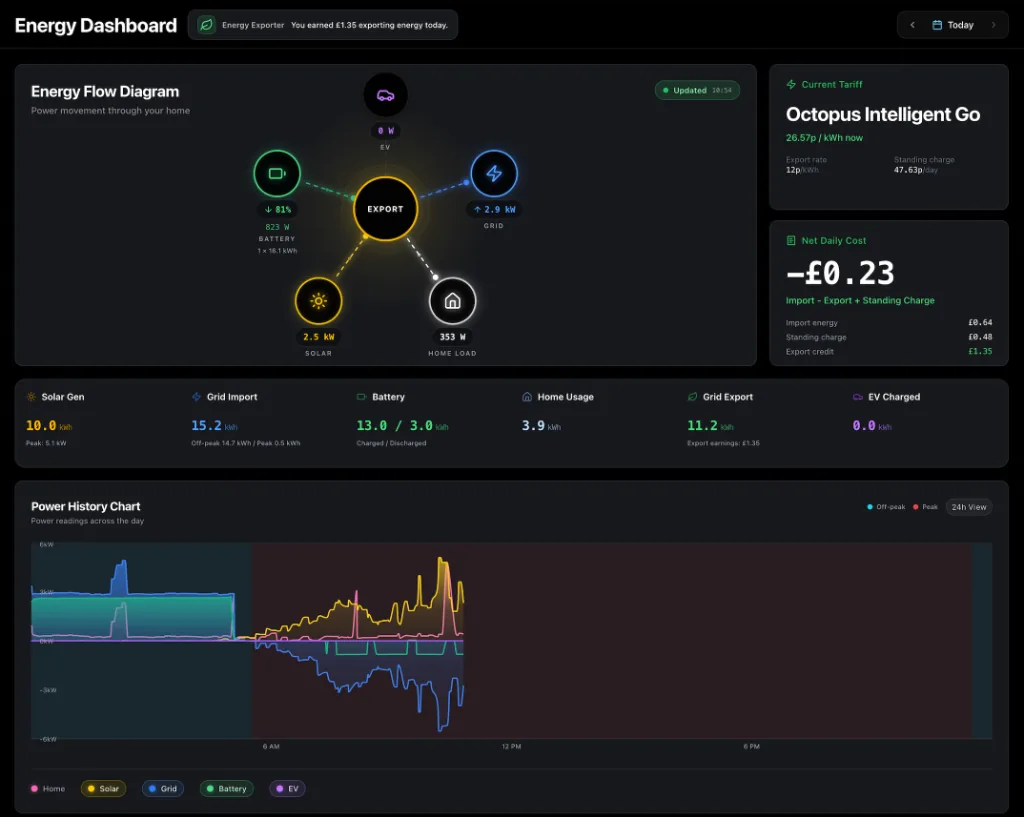
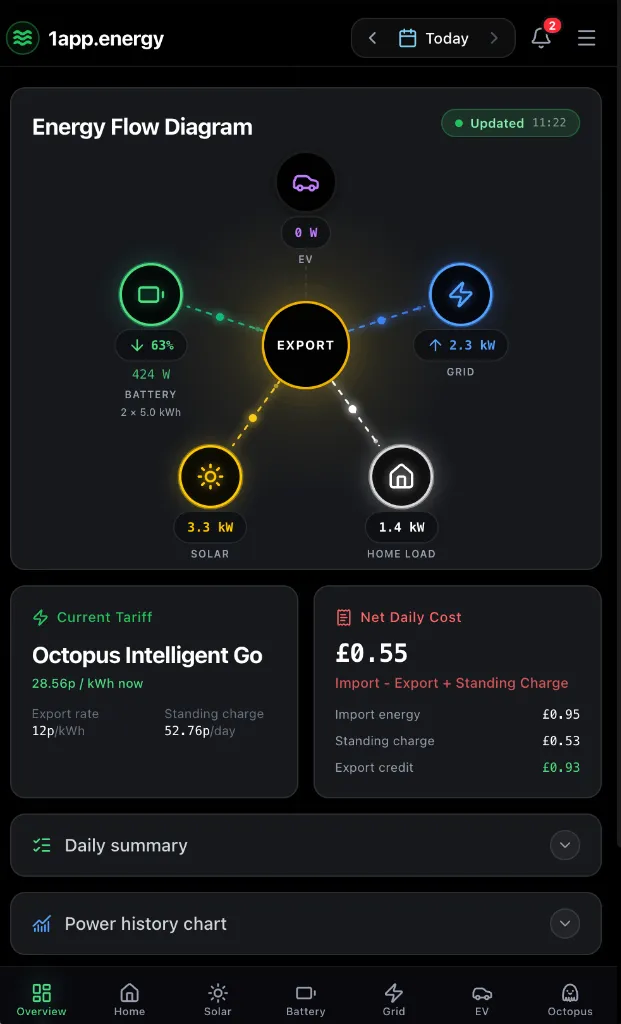
1app.energy mobile dashboard showing whole-home energy flow
The 1app.energy view depends on connected devices, available measurements and the selected date.

The quick answer

Use both, but give each app the right job.

Keep the Ohme app for pairing, vehicle and tariff setup, routine creation, price caps and the complete smart-charging workflow. Use 1app.energy to see available Ohme plans and charging beside the battery, solar, grid and daily cost. On supported, verified homes where EV control is customer-enabled, 1app.energy can also update an existing Ohme target and ready-by time and start or stop charging.

Choose by task

Where each app earns its place

the Ohme app logo

Best for

Use the Ohme app for

Vehicle targets and ready-by times

The Ohme app is designed to turn a vehicle requirement and departure time into a charger-owned plan.

Tariff-led charging

Set the energy tariff, price cap and charging preferences that Ohme uses to schedule the vehicle.

Charger setup and security

Pair the charger, manage the vehicle profile, use Max Charge and access Ohme-specific security and support features.

1app.energy logo

Best for

Use 1app.energy for

EV demand in home context

See supported Ohme state and planned charging beside the inverter, battery, solar, grid and tariff.

See what charging meant for the home

Compare charging periods with separately measured battery, solar, grid, tariff and whole-home cost data.

Optional everyday charge controls

On supported, verified homes where EV control is customer-enabled, update an existing Ohme target and ready-by time or start and stop charging from 1app.energy.

Capability by capability

A comparison without false checkmarks

The useful question is not which app has more features. It is which app is better suited to the job in front of you.

Pairing and charger setup

the Ohme app logothe Ohme app
Primary tool for pairing the charger, selecting the vehicle and managing Ohme-specific setup.
1app.energy logo1app.energy
Not a replacement for setup. Connect the supported Ohme account after the charger works correctly in Ohme.

Targets, routines and ready-by times

the Ohme app logothe Ohme app
Create vehicle targets, departure times, repeated routines and Max Charge behaviour.
1app.energy logo1app.energy
Shows available planned-charge context. On supported, verified homes where EV control is customer-enabled, it can update an existing target and ready-by time; create routines and price caps in Ohme.

Tariff and price-cap scheduling

the Ohme app logothe Ohme app
Ohme uses the selected tariff, charging preferences and price cap to plan charging.
1app.energy logo1app.energy
Places the supported charging result beside the wider home tariff, battery and grid data.

Charging state and usage

the Ohme app logothe Ohme app
Direct charger status, session information and estimated charging cost in the Ohme experience.
1app.energy logo1app.energy
Supported charger state and EV demand in the same view as solar, battery and home energy.

Whole-home battery impact

the Ohme app logothe Ohme app
Optimises the Ohme charging job using the information available to the charger and account.
1app.energy logo1app.energy
Shows whether charging coincided with battery discharge, available solar or grid import during expensive periods.

Technical support

the Ohme app logothe Ohme app
Primary route for charger troubleshooting, connectivity, vehicle profiles and Ohme support.
1app.energy logo1app.energy
Keep Ohme for charger faults and support. 1app.energy focuses on the supported whole-home result.

Real decisions

Which app should you open?

You need the car ready for a departure time

Use Ohme to create the routine, choose the tariff and set any price cap. On supported, verified homes where EV control is customer-enabled, 1app.energy can update an existing target and ready-by time.

You want to know what charging did to the home battery

Open 1app.energy to compare the charging period with battery discharge, solar generation, grid import and tariff pricing.

The smart schedule looks wrong

Start in the Ohme app because it owns the tariff selection, vehicle target and charge plan. Use 1app.energy to inspect the wider home result.

What to know first

Honest limits matter

Compatibility, data quality and control readiness depend on the equipment and account connected to the home.

  • Ohme onboarding and monitoring are available for supported connected chargers, but available plan fields depend on the charger and account.
  • Create routines, price caps and the full smart-charging setup in Ohme. 1app.energy can update an existing target and ready-by time only on supported, verified homes where EV control is customer-enabled.
  • Whole-home conclusions depend on the inverter, battery, grid and tariff measurements available to 1app.energy.
  • Ohme write controls use an unofficial provider interface and may be unavailable or paused. Keep the Ohme app for pairing, connectivity, faults, security and manufacturer support.

Common questions

Straight answers before you choose

Does 1app.energy replace the Ohme app?

No. Keep Ohme for charger setup, targets, routines, tariff-led scheduling and support. 1app.energy adds whole-home context.

Can 1app.energy show what Ohme charging did to my battery?

Where the required devices and measurements are available, 1app.energy compares supported EV demand with battery, solar, grid and tariff data from the same periods.

Can 1app.energy change an Ohme charge plan?

On supported, verified homes where EV control is customer-enabled, 1app.energy can update an existing Ohme target and ready-by time and start or stop charging. Use Ohme to create routines, set price caps and manage the complete smart schedule.

Will every Ohme charger show the same information?

No. Available data depends on the charger, account permissions, provider access and the other connected measurements in the home.

Sources and review

Claims you can check

Reviewed 9 July 2026

Native-app capabilities are taken from official vendor sources. 1app.energy capabilities are limited to supported devices, available evidence and customer-enabled settings. Product features can change, so this page is reviewed rather than treated as permanent fact.

See whether your home is supported

Keep the specialist apps. Add one clearer view of the home.

Start early-access onboarding and tell us which inverter, EV charger and tariff you already use.

Start onboarding